
Training
Your weekly training plan is built from your own data: how many days, which movements, how many sets, how much weight — recalculated every week from the numbers you log.
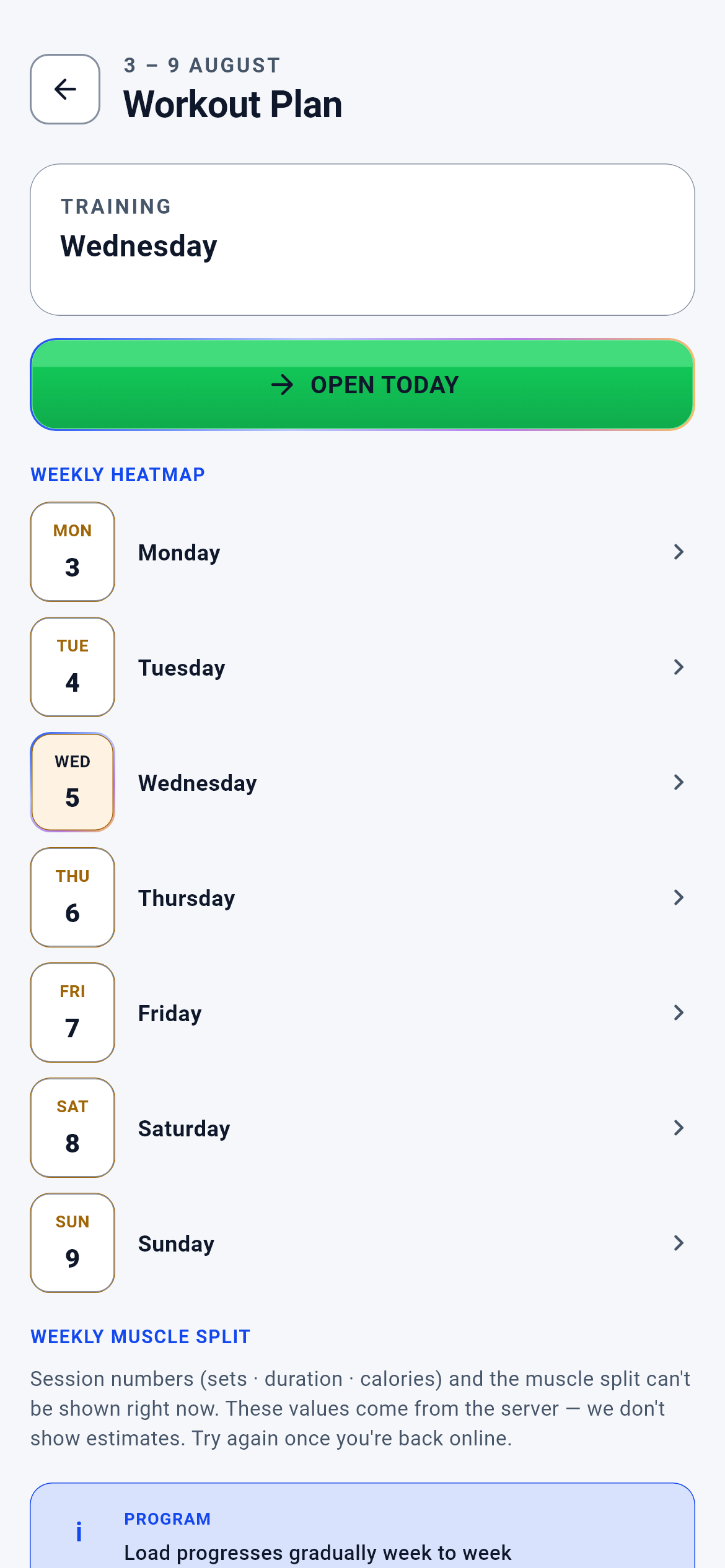
Training Plan · 1/2
The entry screen of the training module. Tapping "Training" on the Dashboard brings you here; this is where you see the whole week at a glance.
You open today and start training; or you tap another day of the week and see that day in full detail.
- Open today → the workout screen (where you tick off your sets)
- Tapping a day row → that day’s detail screen
- Back → Dashboard
- If no plan has been built yet → Profile (to complete the missing details)
What is on this screen 6
Say you open the app on a Monday morning and the heading reads "3 – 9 AUGUST".
The screen always shows the week you are currently in; the week starts on Monday and ends on Sunday.
Training decisions are made per week: volume, the number of rest days and load progression are all evaluated inside a one-week window. If the screen worked per day, "how much did I train this week" would not have a single answer. If a record is left over from a past week, it is moved to the current week at start-up — an old week never freezes on screen.
Even if it is Sunday night, the screen moves to the new week by itself when the week turns; you do not have to do anything by hand.
The system calls this a "Monday-anchored week".
Say the card at the top reads "Wednesday · 7 movements • 27 sets • 39–48 min" with a "METABOLIC INTENSE" badge next to it.
The card tells you what sort of session today is and about how long it will take.
The badge comes from your goal: someone whose goal is fat loss gets "metabolic intense", muscle gets "hypertrophy/tension", strength gets "main-lift focused". This is not a slogan but a setting that changes the plan itself — set counts, rest periods and movement order are all built around that character. Duration and set count are computed from the day’s movement list, and that computation happens ON THE SERVER; the phone cannot write its own number.
If you want the badge to change, change your goal; when the goal changes, so does the character of the session.
The system calls this the "session character".
Say the "WEEKLY HEAT MAP" list shows "REST" on Tuesday and Thursday, while the remaining four days carry movement lists.
How many days a week you train is derived from your level; the remaining days are marked as rest.
We do not let you pick the number of days by hand, because weekly volume and recovery are tied together: writing six days for a beginner would be planning the work they cannot do rather than the work they can. The level tier (L1–L4) sets the day count; intermediate is four days. A rest day is not an empty row but part of the plan — no warm-up prescription is even requested for it.
If you want more days you have to raise your level, and your level is assessed from your training history and your logs.
Say at the bottom, under "WEEKLY MUSCLE DISTRIBUTION", you see bars such as "Legs 46 sets" and "Back 20 sets".
This table splits the week’s total set load across muscle groups.
The decision of which movement writes how many sets to which muscle lives on the server and is read from the movement catalogue. If the phone computed it, a user on an older app version would keep living with old numbers when the catalogue was updated, and the same plan would show two different balance tables on two phones. Worse: an inflated volume would hide a real gap.
If a muscle group keeps showing a short bar, that region was not loaded enough that week; the next week’s plan tries to balance it.
The system calls this the "muscle volume bucket".
Say your connection dropped or the server could not be reached, and you opened the page anyway.
The screen does not invent numbers; it draws a warning block saying "session statistics cannot be shown right now" and leaves the set, duration and calorie fields empty.
If we wrote zero instead of leaving it blank, you would think "my plan has no sets" — but the sets are there, we simply could not fetch them. By the same logic, if even one day of the week cannot be fetched, the whole week’s numbers are switched off: a missing day silently shrinks the total and produces a wrong balance table. Caching yesterday’s answer and showing it is forbidden too: a stale plan is worse than no plan.
If you see that warning, your movement list is correct — only the numbers did not arrive; reopen the screen once the connection is back.
The system calls this "fail-closed" behaviour.
Say you press the green "OPEN TODAY" button in the middle.
The workout screen opens and you start ticking off your sets there one by one.
The plan screen is a display case; the workout screen is a logbook. They are deliberately separate: the plan screen shows the whole week, while the workout screen cares only about the movement in front of you. The button carries the day it belongs to — when you open a day you missed, the system knows which day you are making up.
The more faithfully you enter weights and reps there, the more next week’s plan is born from your actual performance.
Behind the scenes — how the system decides 11
Load progression — where "+2.5 kg" comes from
Say your plan says "4 × 8-12" for bench press and this week you finished the last set with 40 kg for 12 reps. On the next set 42.5 kg shows up.
That 2.5 kg is the load step written in that movement’s prescription — applied once, the moment you touch the top of the band.
The step is not random but a field carried in the movement’s prescription: every planned movement has its own `loadStepKg`, defaulting to 2.5 kg (the smallest valid value is 0.1 kg). The decision passes through a single core that looks at three things at once: (1) did you reach the top of the rep band on the last set, (2) was the effort too high, (3) is this movement open to load changes. If you hit the top and the effort was reasonable, the load rises one step. If the effort was too high (RPE 9.5 and above) there is no increase — it drops one step instead; it also drops if you stayed two reps below the band. If none of these applies, the weight stays the same. For bodyweight movements the step is zero, so the weight never changes; but the moment you clip weight to a belt and enter it, the system sees that and opens load progression.
So "+2.5 kg" is a threshold, not a timer: it arrives the week you touch the top of the rep band and does not arrive the week you do not. If you want the weight to go up, your target is completing the top of the band — not doing more sets.
The system calls this the "load step", and the decision that applies it the "next-set load decision".
Who decides the load step — the server, not the phone
Say two users open the same plan; one is on an old version of the app, the other on a new one.
Both see the same load step for the same movement, because the step arrives from the server with the response.
The load step is a prescription: it derives from your level, your goal and the movement’s class. For a while this number did not exist in the weekly plan body at all and was produced entirely on the device — meaning a user’s weight progression was driven by a number their own phone wrote. When the decision sits on the phone, the owner of the phone can change it; that is a training-safety drift. The step is now carried as an explicit field in the day’s response.
It is impossible to be running on an old progression table because you did not update the app; when the rule changes, everyone moves to the new rule at the same moment.
The system calls this a "server-authoritative input".
Where the coach speaks — which event wakes it
Say you finished your session on Tuesday evening and tapped "Finish", then logged your weight on Wednesday morning. When you open the app on Thursday you see a coach suggestion.
The coach does not speak on its own; it wakes when one of a fixed number of defined events occurs.
The right to speak is bounded by a closed list: twenty-two events are defined across five areas, and nothing outside that list can trigger the coach. The six on the training side are: training day completed, training week completed, missed session detected, progression stall detected, overload risk detected, deload candidate detected. If the list were not closed, every small data change would spawn a notification and the coach would turn into noise — a coach that becomes noise gets muted, and a muted coach is useless.
A silent coach does not mean "broken": it means no event occurred to trigger it. The quickest way is to finish a session and close the week.
The system calls this "event-driven coaching".
When the coach stays silent — four gates
Say you missed your session three days in a row and the system tries to produce the same suggestion each time.
You see that suggestion once; the rest are filtered out before they reach you.
A suggestion passes four gates before it reaches you. First, the confidence threshold: a suggestion whose own confidence score is below 0.4 is never even considered. Second, freshness: an expired suggestion is not shown, because old advice does not describe today. Third, the repeat filter: the same suggestion produced twice within 30 minutes is dropped; if you rejected a suggestion, the same topic does not return for 7 days; if the validator rejected one, it is not retried for 7 days either. Fourth, the quota: a suggestion of the same kind is given once a week. The only exception is severity: a new, more important suggestion deactivates a pending low-importance one and takes its place.
When you dismiss a suggestion with "I do not want this", you are not bothered about the same topic for a week; that is not a bug but a deliberate silence.
The system calls this the "conflict–dedupe–cooldown policy".
The coach’s two voices — the engine’s and the AI’s
Say you see the "Your training coach — keep transitions short" line in the day detail every day, but the long coach note above the weekly plan sometimes does not appear at all.
There are two different coaches: a deterministic one that always speaks, and an AI one that speaks only when its conditions are met.
The short line in the day detail is a fixed cue derived from your goal and level — no internet needed, identical on every open. The long note on the weekly plan is produced by the AI, and if it cannot be produced the area is not drawn at all; no filler sentence is put in its place. Being unable to reach the AI is not treated as a failure: the base plan is already valid, only the commentary is missing.
If you do not see the long coach note, there is nothing wrong with your plan; no commentary was produced that week.
What happens in the engine to the sets, reps and seconds you enter
Say you log the third set of your squat as "40 kg × 10 reps", rest as 95 seconds and effort as RPE 8.
That single row is stored as a record and turns into four separate numbers at the end of the week.
The record carries eight fields: movement, set number, reps, weight, timestamp, effort (RPE), reps in reserve (RIR), actual rest duration and — for time-based movements — seconds. When the week ends these rows are aggregated per movement into: (1) completion rate — how many sets were planned and how many you actually did; (2) rep accuracy — how many of your sets stayed inside the rep band; (3) load retention — was your average weight at least 95% of the planned target; (4) rest overrun — did the average of your actual rests exceed 1.2× the planned rest. That last measure requires at least two rest records, because a single long break (the phone rang) is not a habit. A separate calculation keeps the movement’s best set of the week: the heaviest weight wins, and on equal weight the higher rep count. Rows with zero reps are not counted at all — a set that was not done does not count as done.
Entering weight and reps is mandatory; RPE and rest duration are optional, but when you enter them the engine goes from two measures to four, so next week’s decision is more accurate.
The system calls this the "performance signal" — raw records turned into a decision.
Rest duration — how the seconds you enter change the set
Say you finish a set and mark it "RPE 9.5"; where the screen would normally suggest 90 seconds, this time it shows 120.
The rest period lengthens according to how hard the last set was.
Starting again after the same rest following a very hard set lowers the next set’s reps and drags down the week’s completion rate. The rule is simple: if the effort was "very hard" 30 seconds are added to the base rest, if "hard" 15 seconds; otherwise the duration is unchanged.
Marking a hard set honestly does not slow you down; it raises the chance that you complete the next one.
How next week is born from this week’s data
Say this week you did all 12 of the 12 planned squat sets, your reps stayed inside the band and your weight did not drop. On bench press, meanwhile, you completed only 7 of 12 sets.
In next week’s plan the squat progresses while the bench press is held where it is — the decision is made per movement, not for the plan as a whole.
At the end of the week a performance signal is built for each movement and one of three outcomes is chosen: progress, hold, pull back. The order is fixed and safety comes first. If your average effort is above 9.5, it pulls back. If your completion rate is below 70%, it pulls back. If rests were overrun and completion is below 80%, it pulls back again. Progression comes only when all four conditions hold: completion at least 90%, rep accuracy at least 85%, load retained and rest not overrun. If none applies, the decision is "hold". On top of that, if movement-form analysis saw a risk, it overrides this order and closes progression — adding load while technique is broken produces injury. For female users the progression thresholds are slightly higher (93% and 90%); that is a deliberately more cautious setting.
If a movement sits at the same weight for weeks, the reason is not "the system forgot": that movement’s completion or rep accuracy is not clearing the threshold. Completing the sets you left unfinished gets you further faster than adding weight.
The system calls this the "adaptation decision".
The four-week rhythm — why one week is always light
Say loads and sets rose for three weeks, and in the fourth week the plan suddenly got lighter.
That is not a regression but the fourth step of the plan’s four-week rhythm.
Week types are read from a fixed cycle: week one is establishment, week two accumulation, week three peak, week four pull-back. The cycle is anchored to a fixed starting point in the calendar, so which week is which type can be computed independently of when you started. Without the pull-back week, week four’s load would land on an unrecovered body; fatigue would accumulate and week four would produce regression rather than progress. At advanced level the model differentiates further (block schemes such as accumulation → transmutation → realisation → taper come into play).
Adding extra sessions in the light week because "I did not train enough" defeats the purpose of the rhythm; that week the gain is in recovery, not in training.
The system calls this "periodization", and the light week a "deload".
How much the AI can change the plan — next week only
Say the AI produced a suggestion to "increase shoulder volume" and you approved it. When you start today’s session you see the list has not changed.
An approved suggestion cannot change the week you are in; it only enters next week’s plan as a candidate.
This is not a limitation but a safety oath the system carries: the rules "the current week cannot be modified" and "movements cannot be swapped directly" sit in the code as hard `false` values and are not configurable. The reason is simple: changing the plan halfway through a week also breaks that week’s measurement — what you measured becomes unclear and the next decision loses its ground. On top of that, a suggestion cannot even become a candidate without a "passed" stamp from the validator.
When you approve a suggestion you see its effect on Monday; this week’s plan is deliberately left untouched.
The system calls this "next-week candidate only".
A missed day — what the plan counts as "missed"
Say Tuesday was a training day, you never opened it, and today is Thursday.
Tuesday is marked "missed"; today and the days after it stay "planned".
A day counts as missed only if it is in the past and carries no record at all. A day you started but did not finish stays "in progress"; a day you finished becomes "completed". If there is a record on a rest day, that counts as completed too — stepping outside the plan is not punished, it is recorded. The distinction matters because the missed-day count is both one of the events that trigger the coach and a determinant of the week’s completion rate.
To make up a missed day, just tap it on the plan screen and open it; the system knows which day you are making up.
What your data is for 7
Your age, height, weight, sex and goal (the onboarding steps)
If you provide it A plan can be produced: your goal sets the session character, your level the weekly day count, and your height and weight the calorie range.
If you skip it When profile information is missing the server refuses to produce a plan (a visible failure) — it does not invent a default plan from incomplete data, because an invented plan means incorrect loading. On an account where no plan was ever produced, the screen shows the "No training plan found" surface.
Your health declaration (cardiac, metabolic, orthopaedic conditions, medication)
If you provide it If you declared a condition and also ticked medical clearance, the plan is built, but a "medical clearance" notice stays permanently at the top of the screen — the system does not forget your particular situation.
If you skip it A condition you did not declare cannot be known by the system; the plan is built assuming a healthy user. If you declared one but did not obtain clearance, the training plan screen does not open at all — the server withholds the plan and the health gate screen comes up instead.
The weight and reps you enter per set
If you provide it The threshold for load progression is read from these two numbers: the moment you touch the top of the rep band, the weight rises one step. Your weekly tonnage, your best set and your progress chart are all born from them too.
If you skip it The engine does not go quiet, but it cannot progress you: with no records the performance signal is built as "no data" and the movement’s decision becomes "hold". So the plan continues another week at the same weight and the same sets.
Your effort marker (RPE / RIR)
If you provide it The safety brake engages: on movements where you struggled, load is not increased — it is lowered if needed, and the rest between sets is extended.
If you skip it Effort is assumed to be "normal". The plan still works, but in a week where you overloaded the system cannot see it; load progression is decided by rep count alone.
Your actual rest between sets (seconds)
If you provide it A fourth measure joins the weekly assessment: if your rests exceeded 1.2× the planned rest and your completion is low too, the plan pulls back — fatigue is noticed before it accumulates.
If you skip it The rest measure does not enter the calculation at all (at least two records are needed). The decision is made with the remaining three; a result is still produced, but one signal is missing.
Closing the session with "Finish"
If you provide it The day counts as "completed", it enters the week’s progress summary, and one of the events that can trigger the coach (training day completed) is raised.
If you skip it Your records are still stored, but the day stays "in progress"; the missed/completed day count is left incomplete and the coach raises no event from that day.
Movement-form analysis (your technique video / form score)
If you provide it On movements where a technique risk is seen, progression is closed; if the score is very low the load is lowered as well. This decision overrides every other rule.
If you skip it Without a form signal the decision looks only at numbers. As long as you can fill the rep band with broken technique, the system keeps proposing load increases — it does not guess at what it cannot measure.