
Your TrainerCOMING SOON
Once a month, a written review from a real trainer who has read your own data. The area is not open yet; today the screen shows what is coming and collects your vote on the launch order.
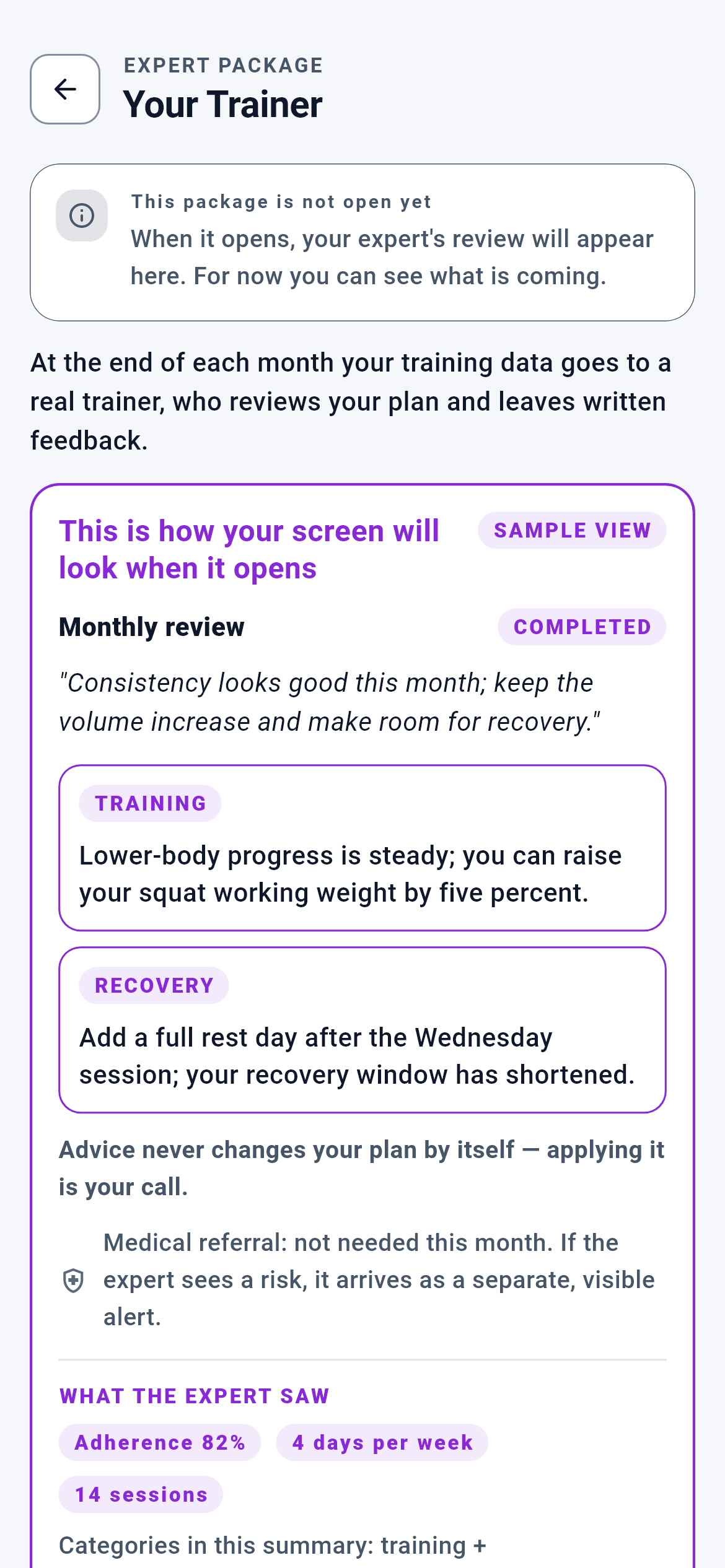
Your Trainer · 1/5
The left TRAINER wing of the two-wing bar at the bottom of the Dashboard. Its address is /uzman/antrenor.
You see what the trainer package will do once it opens; you vote on the launch order with the button at the bottom of the page.
- The back arrow at the top left → Dashboard
- The vote button at the bottom → does not leave the page; the button changes state in place
What is on this screen 3
Say you tap the purple TRAINER wing at the bottom of the Dashboard and the screen opens. You knew the tab was locked; you went in anyway.
The screen opens and a note at the very top says "This package is not open yet".
Making a locked tab entirely untappable never teaches you what is behind it; someone who never learned will not care when it opens either. Here the lock means "not open yet", not "you may not enter", and the route is already live at its real address — when the package activates the address will not change, only the screen behind it.
Do not read this as an ad page; you are reading the very screen you will meet when it opens. Bookmark the address and it will take you to the real screen once the package is live.
The system calls this a "locked display case".
The right wing of the same bar reads DIETITIAN and is green. The trainer wing is purple.
Both wings are drawn from a single screen class; the only difference is the expert type passed into it.
With two separate screens, one would be updated and the other would age, and you could not see which had aged. One class, two values: on the trainer branch the title is "Your Trainer", the advice tags are TRAINING and RECOVERY, and the data shared is your training history. On the dietitian branch all three change.
Every line here is specific to the trainer. The text on the dietitian tab is different, and the rules of the two areas never mix.
In code this is called "one component, two faces".
In the middle of the page there is a purple-framed box with a "SAMPLE VIEW" badge at its top right. You try tapping the cards inside it.
Nothing inside the box responds to touch.
A button that looks pressable but does nothing makes the screen itself a liar. The box contents are closed to touch and also removed from the screen-reader tree, so a blind user is not even told "there is a button here". The badge is structural too: if the frame is there, so is the badge — it cannot be removed.
What is inside the box is not your data and you are not expected to do anything there. It is a drawing of how the screen will look when the package opens.
The system calls this the "demo frame".
Behind the scenes — how the system decides 6
Adherence (82%) — the first number the trainer sees
Say you train four days a week and completed fourteen sessions through March. At month end your trainer’s screen reads "Adherence 82%".
The trainer does not compute this percentage; the server does, as the average of the last four weekly packages’ adherence scores.
Leaving adherence to the expert’s eye would mean every expert building their own scale — one would say "going well", another would call the same data "weak", and two clients could not be compared. When the number comes from the engine the scale is the same for everyone; the expert’s job becomes interpretation, not measurement.
Logging your sessions in the app is the only input to this number. A session you did not log counts as not done, and adherence looks low.
The system calls this the "weekly adherence score".
Volume trend — sent EMPTY today
You look at the chips in the demo box: adherence, days per week and session count. There is no chip such as "Volume +8%".
The summary schema has a volume-trend field, but the producing service always leaves it empty today.
Computing volume trend correctly requires raw set totals, and that work was deferred to a separate round. Drawing a chip for an empty field would put a line in the display case that no trainer can see today — a display case may shape the product, but it cannot promise what the product does not have.
Your trainer will not say "your volume rose by this much"; they speak in terms of total sessions and adherence. When volume trend is added, the chip is added too.
In code this is the "in the schema, not in the computation" case.
Freezing the summary when the month closes
Say your trainer wrote the March review on 2 April. You read it on 20 April, and in the meantime you back-filled a missing March measurement.
The summary the trainer saw is produced when the period record is first prepared and is never recomputed.
If the summary were recomputed later, the table the expert looked at would diverge from the one you see and the question "what were you looking at when you wrote this?" would have no answer. For the same reason the review is written once: the expert cannot edit it afterwards, because text that changes after you read it produces the "you did not write that to me" situation.
Logging your data within the month matters. A record you enter after the month closes does not enter that month’s summary; it counts towards the next period.
In code this is called a "state machine".
The wall between advice and the plan
Your trainer wrote "you could raise your squat working weight by five percent". The next morning you open the app and look at your plan.
The plan is unchanged; nothing your trainer wrote enters plan production.
Exactly one file touches the review record, and the side that produces plans never reads it. So this is not an interface decision but two systems that were never wired together. The engine’s decision comes from the data you enter; a sentence written from outside cannot break that chain.
If you want to act on the advice, you raise the weight in the session yourself. When you log the raised weight the engine builds next week from that new data — so the advice enters the plan through your log, not through your trainer’s pen.
In code this is called "module isolation".
Skipping a period — it does not end the relationship
Say work kept you to three sessions in April and you do not want that month reviewed.
You skip that period; your relationship with the trainer continues and May runs normally.
If the only options were "review it or end the relationship", a bad month would become a reason to quit. Skipping is only possible while the expert has not written yet: work already done is not taken back.
You do not have to drop the package over a weak month. You skip it and pick up where you left off the next month.
The system calls this "period skipping".
The launch order — which area opens first
Five areas are closed: the athlete store, the nutrition basket, trainer, dietitian and GymSphere. They cannot all open at once.
The order comes out of a vote count broken down by area and country.
The alternative was to open the package and discover demand afterwards: three hundred people buy, there are four trainers on hand, and three hundred people have to be told "wait". Counting before anyone pays lets you build the pool to that number. Breaking the count down by country ensures the pool is built in the right country.
If you want to speed up when this area opens, the one thing to do is vote. An area with no votes falls back in the order.
In product terms this is called "demand validation".
What your data is for 6
The training sessions you completed
If you provide it The month’s total session count and its spread across weeks enter the trainer’s summary; they see a line such as "fourteen sessions" and grasp how the month went at a glance.
If you skip it The session count shows as zero. The trainer treats the month as empty and writes accordingly — as far as the summary is concerned, having trained without logging and not having trained at all are the same thing.
The adherence score in your weekly packages
If you provide it The last four weeks are averaged and become the first number the trainer sees, as the "Adherence 82%" chip.
If you skip it The adherence field stays empty. The trainer cannot see your consistency as a number and their comment rests on session count alone.
Your level and weekly day count in the profile
If you provide it The trainer sees the target "intermediate, four days a week" and reads your actual session count against it.
If you skip it Both fields travel empty. The trainer cannot tell whether fourteen sessions is a lot or a little for you; there is no target to compare against.
Your body measurements (waist, hips, neck, weight)
If you provide it Your latest measurement at period end, that month’s Body Form Analysis and the change between the two months travel to the trainer — the difference in body-fat percentage, lean mass and weight.
If you skip it The measurement section is not produced at all. The trainer cannot see which way your body moved over the month and bases their advice on training numbers alone.
The country on your account
If you provide it Your vote is recorded together with your country and enters the launch-order calculation as that market’s row.
If you skip it If the country cannot be resolved, no record is written at all; the endpoint returns 409, the button does not appear pressed and a "Could not be saved right now" warning is shown. So your vote does not count, and you can tell from the screen.
The category permissions you gave the trainer
If you provide it If the training and measurement categories are open, the summary is built from those two sections, and the line "Categories included in this summary: training + measurements" shows you that too.
If you skip it With no permission record there is no permission, and that section’s queries never run — data that was never produced cannot leak. The trainer does not see an empty section; they do not see the section at all.