
Profile
Every engine that builds your plans reads one record: your profile. Each field you change here knows which engine it must refresh.
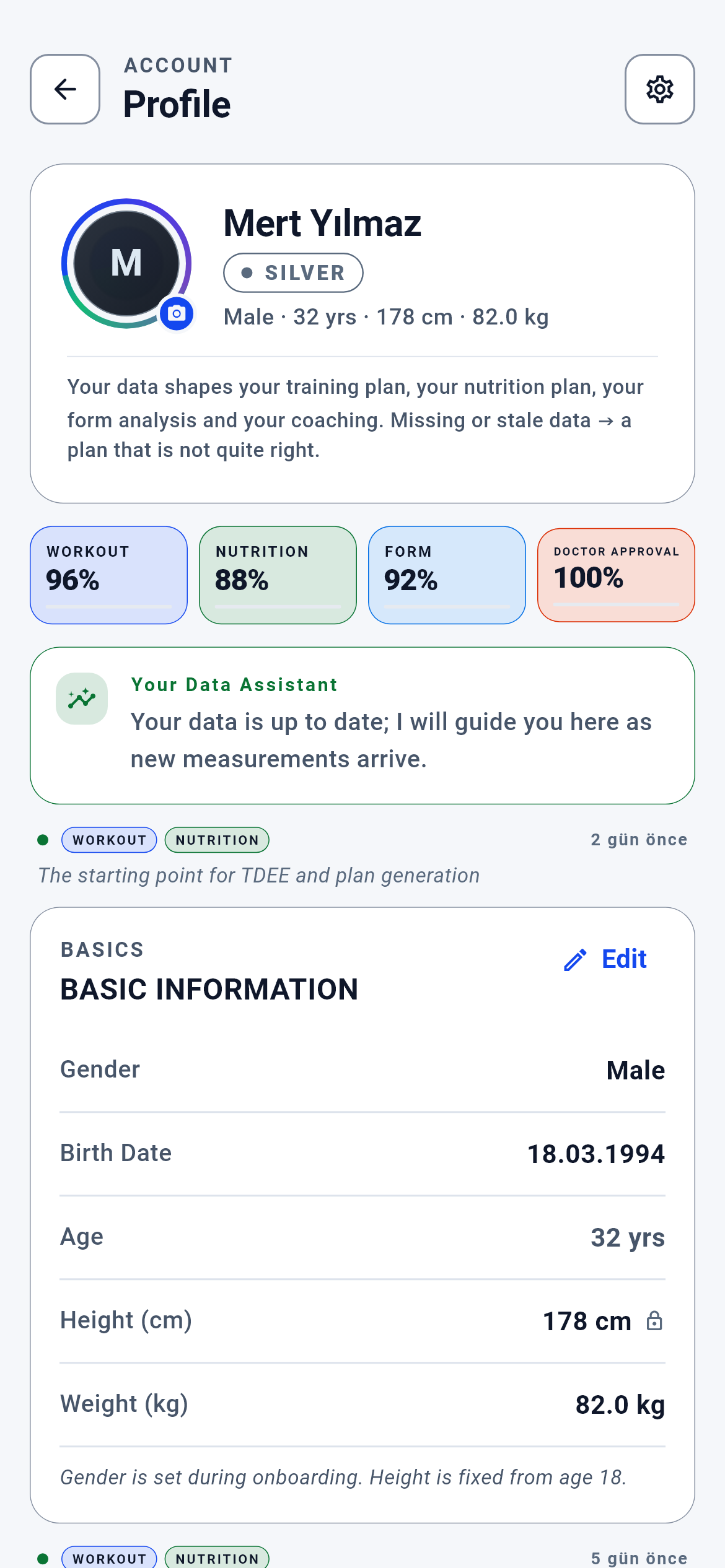
Profile · 1/11
The profile module’s main screen. You get here from the bottom menu or the account entry on any screen; the rest of the module (health declaration, measurements, settings) branches from here.
You see the data the engines use section by section, edit what has gone stale and save.
- Settings — the gear at the top right (profile_screen.dart:394)
- My Health — the detail link in the health declaration section (profile_health_declaration_section.dart:148)
- Manual Measurements — the body measurements section (profile_screen.dart:146)
- Store — tapping equipment you do not own opens that category (profile_screen.dart:267)
- Back — the screen you came from, or the home screen (profile_screen.dart:264)
What is on this screen 4
Say the four boxes at the top read "TRAINING 96% · NUTRITION 88% · FORM 92% · MEDICAL CLEARANCE 100%" and you wonder who computed these percentages.
These four numbers are computed by the server, not your phone, and arrive ready-made.
The percentages look at a threshold: how many days ago the data was entered. If the phone supplied the clock for that "how many days" calculation, on a phone with its clock wound back the day difference would never grow and readiness would always read 100%. So the clock, the profile spine and the measurement counts are assembled from the server’s own vault; the client never sends these fields.
When a number drops it is not a fault but a real signal: one of the fields that engine reads has gone stale. Open the section and update it and the number comes back up.
The system calls this a "server-authoritative input".
Say you are on a plane with no internet and you open your profile. The readiness boxes and the "2 days ago" lines are missing.
When the freshness response cannot be fetched, the screen does not draw that band or those lines at all.
With no response there are two easy lies: writing 0% ("your profile is empty") or 100% ("everything is fine"). The second is dangerous, because you would take a plan built with a two-month-old weight for a current one. So the code opens no third branch — the result type has exactly two branches and the compiler forces the caller to handle both.
If the band is missing, do not worry; it returns when your connection does. Its absence means "I cannot measure right now", not "your data is bad".
The system calls this "fail-closed" — never reassure while in doubt.
Say each section has small TRAINING / NUTRITION tokens above it and you wonder what happens if you change that section.
Those tokens are not decoration; they read from the field definitions which engines that section’s fields feed and show it.
Every profile field’s definition carries two flags: does it affect the training engine, does it affect the nutrition engine. The token in the section heading is the sum of those flags. So the list is not written by hand but derived from the field definitions — when a new field is added the token stays correct by itself.
Before editing a section, look at the tokens: you see which plan will be rebuilt before you even save.
The system calls this a "derived impact map".
Say there is a small lock icon next to the "Height (cm)" row and you cannot change your height.
For users who have turned 18 the height field is locked.
Height no longer changes in adulthood and sits in the denominator of the body-fat formula. A mistyped figure (187 instead of 178) quietly shifts both your body-fat percentage and your daily calorie target. The threshold is defined in one place in the code; the screen reads that number rather than restating it. If age is unknown the field stays locked — the safe direction.
If your height really is wrong it is corrected through support; if it could be changed freely, the comparability of all your past measurements would break.
The system calls this the "age policy lock".
Behind the scenes — how the system decides 6
Why the profile is the single source of truth
Say you entered 88 kg at sign-up and months later updated it to 82 kg in your profile. Which number do the engines read now?
If there is an accumulated record in your profile the engines read it; if not they fall back to your sign-up answers.
Two records exist: your onboarding answers and the current spine accumulated in your profile. The read order is defined in one place — the spine first, onboarding if it is empty. Without that order each engine would read whichever source it preferred and the training plan would be built with 88 kg while the nutrition plan used 82. Two different truths for one user is a contradiction the user could never detect.
If you want to change a number, change it in your profile; your onboarding answers are an archive the engines consult only when the profile is empty.
The system calls this the "single source of truth".
Which field feeds which engine
Say you made two changes: one raising your training level from L2 to L3, the other moving your daily activity from "desk work" to "physically active work".
The first rebuilds only the training plan, the second only the nutrition plan; weight, height and date of birth rebuild both.
Every profile field’s definition carries two flags. Level and goal carry the training flag (split, volume and movement pool are built from them); daily activity and step band carry the nutrition flag (the daily expenditure estimate is built from them); weight, height and date of birth are marked on both, because they enter both the load and the calorie calculation. When you save, these flags are intersected and only the affected plan’s cache is dropped.
A small correction does not rebuild all your plans — only the engine that field touches is refreshed. On a change that affects training, an information strip on screen says so.
The system calls this the "field → engine impact map".
When the same week’s nutrition plan is rebuilt
Say on a Wednesday you switch your goal from "fat loss" to "muscle gain". What happens to this week’s plan?
If a nutrition-affecting field changed, the server is asked whether the same week should be rebuilt; if none changed, it is not asked at all.
The decision lives on the server, because "is it right to change a plan mid-week" is a product decision that must be changeable without waiting for an app update. But the question is not asked on every save: waiting for a network round trip when you only changed your avatar would put a pointless delay in front of the save button. So the gate opens only when a nutrition-affecting field changed.
Making a goal change at the start of the week gives the cleanest result; whether a mid-week change lands on this week or the next is determined by the server’s decision.
The system calls this a "server-side feature gate".
How the health declaration constrains the plan
Say you marked your shoulder sensitivity as "mild" and the next week some pressing movements in your plan were replaced by others.
Your declaration narrows the movement pool before the plan is built.
The chain has three steps: the condition you marked becomes a constraint flag, the severity you chose a load ceiling, and together they become a pool filter. The filter runs BEFORE the plan is built — running afterwards, there would be movements shown to you and then withdrawn. If you mark nothing, the filter step is never assembled and the whole pool is used.
When you pick up an injury, update the declaration and refresh your plan; the engine adapts automatically at the next build.
The system calls this a "pre-build pool filter".
Why the nutrition plan and measurement sections are not visible to everyone
Say your friend’s profile has "Nutrition Plan" and "Body Measurements" sections and yours does not.
Those two sections are drawn only for accounts with nutrition access.
Both sections collect nutrition-specific data: diet type, grocery access and the seven circumference measurements. The training engine does not use them. Asking a user without access for this data would be making them fill in a form with no output. For the same reason the profile completion percentage does not count these sections while they are hidden — an invisible section cannot count as "missing" and drag the percentage down.
If you do not see the sections your profile is not incomplete; the engine that reads that data is closed on your account.
The system calls this "segment separation".
Why an unknown age is written as "—"
Say you never picked a date of birth. The screen reads "Date of birth: not selected", with the age line beside it reading "—".
When age cannot be computed it is shown as empty rather than zero.
In the data model the age number cannot be empty and returned zero when there was no date of birth; printing that as is, "0 years" appeared right next to "Date of birth: not selected". The system was speaking as if it knew something it did not. Since zero is not a valid age in this product, it is converted to empty in one place, and every surface reading that line becomes honest at once.
A "—" in a field means the system does not know that value; fill it in and the relevant engine’s readiness percentage rises too.
The system calls this an "honest empty".
What your data is for 8
Date of birth, height and weight
If you provide it Your daily calorie target and your training load are computed from your own measurements; both read all three of these fields.
If you skip it If both the profile and the onboarding record are empty, the system has to work with a synthetic default profile (30 years, 170 cm, 70 kg). A plan is still produced but it is not yours; nor is this silent — it is logged as a data-integrity signal.
Your training level and goal
If you provide it Your weekly split, volume and movement pool are built from these two; change them and the plan is rebuilt, with an information strip on screen saying so.
If you skip it When the level cannot be read, the lowest (L1) is assumed. You do not get a wrong programme but an easier one than you should — progress is slower than you expect.
Your daily activity and step band
If you provide it Your daily energy expenditure counts your non-training movement too; a desk worker and someone on their feet all day get different calorie targets.
If you skip it These two fields feed only the nutrition engine. Left empty your training plan is unaffected, but your calorie target drifts from your real expenditure — one of the most common reasons progress on a weight goal stalls.
Your neck, waist and hip measurements
If you provide it Your body-fat percentage is computed with the Navy formula, and your daily calorie target is built from it.
If you skip it Saving is blocked and you are told which three measurements are needed. With no measurements at all the body-fat percentage cannot be computed; the form analysis cannot speak region by region and only a general estimate from your weight remains.
Your health declaration (constraints and joint sensitivities)
If you provide it Every constraint you mark narrows the movement pool before the plan is built; the severity you choose becomes a joint-load ceiling.
If you skip it If you mark nothing the engine applies zero filters and uses the whole pool. That is a deliberate default rather than a gap — but if you really do have a constraint and did not write it, the plan cannot know.
Nutrition plan setup (diet type, cost standard, foods you dislike)
If you provide it Your weekly meal plan is built from foods you can obtain and will eat; when you save, that week’s plan is dropped for rebuilding.
If you skip it Plan production stays closed until all three fields are explicitly chosen. A deliberate decision: quietly treating an unselected field as "standard diet" would mean producing a plan containing meat for a vegetarian.
How current your data is (when you last touched it)
If you provide it Your readiness percentages stay high and no warning appears at the top of your profile.
If you skip it As data ages the server first lowers the readiness percentage, then places a warning box at the top of your profile. Plans keep being produced but from old measurements; the warning exists precisely so you see that.
Your reminder times
If you provide it You get a notification 30 minutes before training, 15 minutes before a meal, and again at the exact time.
If you skip it If you set no reminders the app sends you no training or meal notifications of its own. The weekly report is independent of this and is on by default.