
Dashboard
One screen tells you what today is: your storefront, your coach’s line, today’s workout, your nutrition target and your progress.
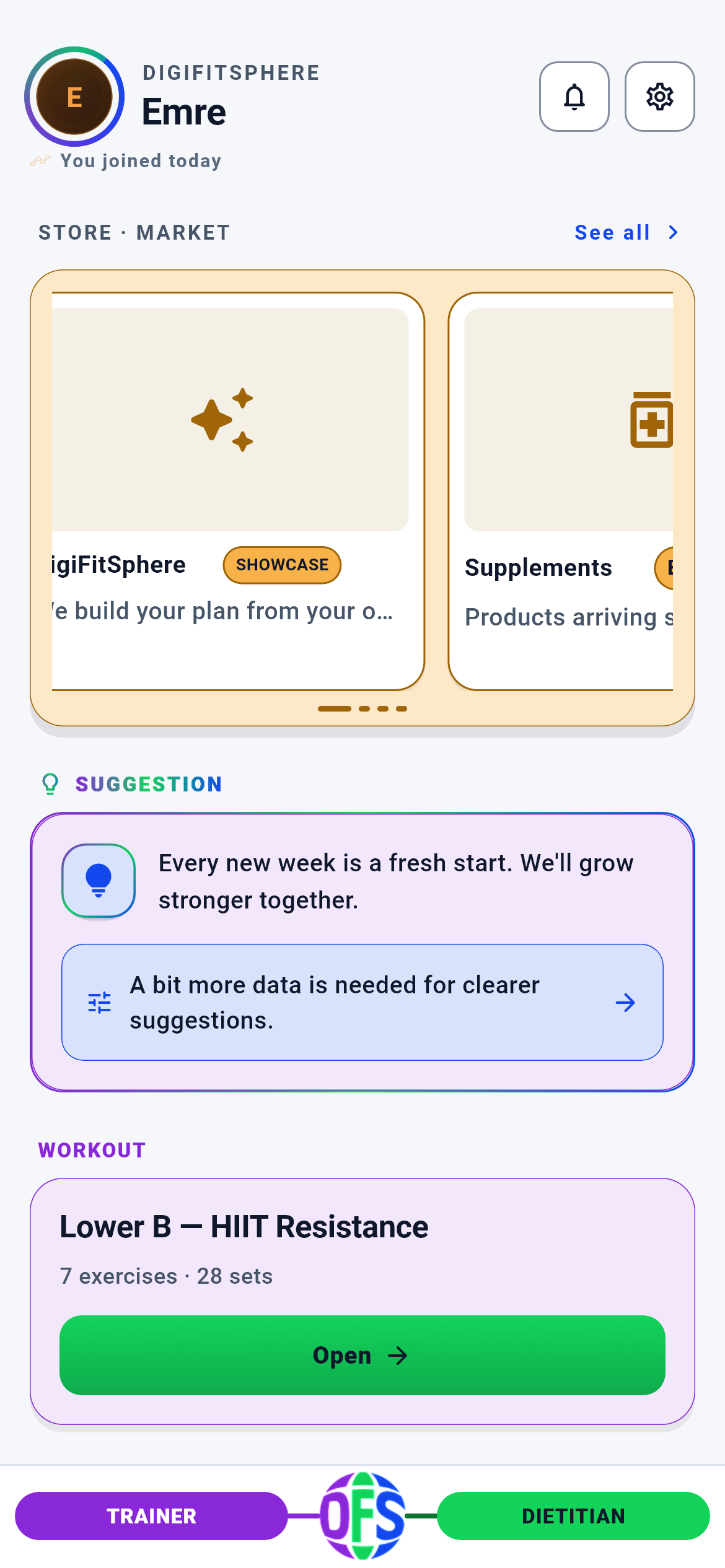
Dashboard — upper half · 1/4
The app’s home screen. After signing in you land here on every launch; the bottom navigation bar is drawn only here.
You read what today is and move to the relevant module in one tap — the Dashboard itself is not a working screen but the start of the day.
- The storefront / “See all” → KY Market
- A product card in the storefront → that product’s detail page
- The action line on the advice card → its target depends on the advice code (Training plan · Nutrition · Body Form Analysis · Statistics)
- The “Open” button on the training panel → today’s training plan
- Top right: bell → Notifications · gear → Settings · avatar → Profile
- Bottom bar: Trainer · Dietitian · the sphere in the middle → GymSphere
What is on this screen 6
You open the app in the morning. Your name and avatar are at the top, with a small grey line underneath: “You joined today”.
That line tells you which day of your KY journey you are on.
The server returns only a unit and a number (today / day / month / year); the phone builds the sentence. That way the same fact stays correct when you switch to English. If the server sent no first-seen record at all, the line is not drawn — no invented “day 1” is written.
If the line is missing, nothing is wrong: the journey record simply has not formed yet, and the rest of the Dashboard works normally.
The system calls this an “honest empty”.
You expect a thin progress bar right under your name, but sometimes “cannot be shown” appears instead.
The bar is drawn only if an XP snapshot arrived from the server.
It used to be that when no data arrived the bar was filled by a fixed ratio derived from the level NAME (Beginner 18%, Intermediate 45%, and so on) and users took it for their real progress — while the number measured nothing. Drawing it at zero is banned too, because zero is also a claim and reads as “I have made no progress at all”.
If you want to see the bar, log at least one session this week; XP derives from your weekly session rows.
The system calls this “fail-closed”.
The large card at the very top of the Dashboard looks like a shop shelf: products drift slowly left and right.
This is your weekly storefront of 16 products chosen for you; it scrolls by itself, and you can swipe it too.
The store sits at the VERY TOP of the Dashboard, and that is a deliberate product decision. On 2026-07-17 an information-architecture audit moved it down, arguing “the user’s own work should come first”; the product owner reinstated the commercial priority and the store returned to first place.
If the card looks empty there are three possible reasons and each writes its own sentence: “loading” (wait), “no products right now” (waiting changes nothing), “accept the privacy notice” (tap and accept, and the screen fills immediately).
The system calls this a “state machine”.
Below the storefront there is a purple card headed “ADVICE” with a lightbulb icon: “Every new week is a new start…” and an arrow line underneath.
This is the free user’s coach slot — the deterministic coaching brief.
The coach slot is a SINGLE card on the Dashboard and shows one of two mutually exclusive cards depending on tier: this “ADVICE” card on free, the “Your coach’s advice” card on premium. The two are never drawn together; in the wellness segment the slot is hidden entirely.
Which screen the arrow line takes you to is chosen from the message code the server sent, not from the card’s TEXT — so the same tap goes to the same place even if you change the app’s language.
The system calls this a “mutually exclusive slot”.
Under the “TRAINING” heading it reads “Lower A — Quad · 7 movements · 27 sets” with a green “Open” button.
That line is the summary of today’s planned training day: the region name, the movement count and the planned set count.
The numbers are not computed on the Dashboard; they are read from today’s day summary. If completed sets equal or exceed planned sets, the card switches to a “completed” badge — the card works out for itself that you are done.
When you press “Open”, the Dashboard first asks the plan engine for today’s plan and opens the workout screen with it once the answer arrives. If the plan cannot be fetched the button SILENTLY does nothing and a log entry is written — not entering is preferred over entering the wrong plan.
The system calls this “plan resolution”.
A bar is fixed at the bottom of the screen: purple “TRAINER” on the left, green “DIETITIAN” on the right, the KY sphere in the middle.
It is three doors: two expert wings and GymSphere in the middle.
The sphere in the middle is not decoration but the third door. It could not be a “back to Dashboard” button, because the bar is only drawn on the Dashboard anyway — a button that returns to its own screen is a dead button. Which screens draw the bar is not left to judgement but locked by a classification table: every route must be in either the “bar” or the “no bar” set.
The wings are locked today; the lock means “not open yet”, not “you may not enter”, and the tabs still open.
The system calls this the “route policy test”.
Behind the scenes — how the system decides 10
Who picks the 16 products in the storefront — 1/4: the raw score
You open the Dashboard and the first card in the storefront is “Whey Protein Isolate 1kg”. With hundreds of products in the catalogue, why this one?
Every product first receives a score, summed from four parts.
The parts are: (1) SEGMENT FIT 0–100 — how close the product’s tags are to your segment (goal × level × sex), averaged over the product’s recognised tags; (2) FRESHNESS +20 — if it has not been shown to you yet this week; (3) ROTATION PENALTY −15 — if it was shown before but not bought; (4) CAMPAIGN +30 — if an active campaign covers that product and targets your segment. The total is clamped to 0–200, then sorted by score descending, with product id breaking ties. There is no randomness: the same input always yields the same order.
That is why your storefront changes by itself during the week: if you saw a product and did not buy it, its score drops the following week and something else takes its place.
The system calls this the “composite score”.
Who picks the 16 products — 2/4: where your segment comes from
At sign-up you said “fat loss”, chose intermediate level and entered male. Where does the storefront read these from?
Your segment is born from three fields: your training goal tag, your level tier and your sex.
All three are read from your profile spine — the single record where onboarding and profile edits converge. The mapping is one to one: goal tag `fat_loss` → fat-loss segment, `muscle`/`toning` → muscle, `strength` → strength, `health` → health; level `L1` → beginner, `L2` → intermediate, `L3`/`L4` → advanced. An unrecognised or empty value does not silently fall back to an assumption like “male”: sex falls back to “unspecified”, goal to “health”, level to “beginner”.
If the storefront feels alien to you, the first place to look is the goal and level in your profile — fix those and the storefront changes on the next load.
The system calls this the “profile spine”.
Who picks the 16 products — 3/4: category balance and filtering
You open the storefront with a fat-loss goal. Nothing but protein powder would be odd; instead organic food, recovery products and equipment appear among them.
After the scores are sorted, a category quota is applied.
There is a fixed allocation table per goal. On fat loss the 16 slots split as: supplements 4, organic food 4, health/recovery 2, bundles 2, equipment 1, apparel 1, protective 1, accessories 1. On a muscle goal supplements rise to 5; on strength, equipment rises to 3. The candidate pool is built by taking the best 5 products from each root category — so no single category can capture the pool. AHEAD of all this a safety gate runs: in cases such as a declared pregnancy or breastfeeding, or being under 18, unsuitable categories are filtered at product-id level, and that filtering is applied SEPARATELY to the cache, to purchased slots, to the candidate pool and to the AI’s proposal. If the gate cannot be consulted, the storefront stays EMPTY — the behaviour “the gate failed, show everything” deliberately does not exist.
Updating your health declaration narrows the storefront immediately; that is a safety decision, not a restriction.
The system calls this “category quota plus a fail-closed safety gate”.
Who picks the 16 products — 4/4: what the AI can and cannot do
You turn on the personalisation switch in the Profile screen. A week later the storefront looks slightly differently ordered.
The AI reorders the list; it CANNOT add products to it.
The AI is sent only the candidate pool produced by the deterministic engine, the slot count and the category quotas. Its suggestions pass three filters: anything not in the candidate pool is dropped, anything already purchased is dropped, anything the safety gate filtered is dropped. If what remains does not even reach half the slot count, the AI’s answer is discarded entirely and the deterministic order is used. If personalisation consent is off, this step never runs and the storefront still comes back full. The rationale text the AI writes is also sanitised against HTML, scripts and control characters and truncated to 120 characters.
Withholding consent does not empty the storefront — only the ordering stops being personalised. There is no such thing as “the store does not work with AI off”.
The system calls this the “AI rerank layer”.
The line under the card — what “PROTEIN GAP” means
Under the protein card in the storefront there is a line such as “FOR FAT LOSS · ₺799”; another card reads “Suits your strength training plan”.
That line is assembled from two separate sources: the reason that put the product in the storefront, and the suitability badge the server attached.
The reason is a language-independent key for why the product entered the list (campaign, goal fit, protein gap, and so on) and its text is resolved on the phone. The badge comes from a separate server endpoint; its inputs — segment and safety flags — are written from the vault, and the phone sends only the list of “which products am I asking about”. If the badge endpoint is silent the device does NOT invent its own badge and no badge is drawn — a made-up “72% match” would steer you to the wrong product. The card still appears; the badge is not a precondition for it.
If you see no reason on the line, only the price remains; that does not mean the product is unsuitable for you, it means the badge decision could not be made at that moment.
The system calls this a “thin client”.
The need signal — which measurement produces “protein gap”
Last week you logged meals on 5 days and your daily protein average stayed below target. This week protein products come to the front of your storefront.
A second line runs alongside the storefront: need-based recommendation.
This line’s inputs come from four measurable sources: (a) the macro targets the nutrition engine produced and when it produced them, (b) the protein adherence ratio computed from the latest weekly nutrition summary — total protein ÷ logged days ÷ protein target, (c) this week’s completed session count from the coaching history, (d) safety flags from the profile spine and health profile. At one point the nutrition fields never reached this collector at all; freshness stayed “unknown” and the need engine fell back every time — that is, it was dead in production.
If you do not log meals, the protein-gap signal never arises and your storefront is built from your segment alone. Keeping logs personalises the storefront too.
The system calls the failure mode “input starvation” and its counterpart the “need signal”.
When the coach speaks and when it stays silent
One day the purple “ADVICE” card is on the Dashboard; the next day it is gone.
The coach slot decides by four rules, in order.
The order is: (1) if you are in the wellness segment the coach surfaces are off and the slot is hidden; (2) if you have premium access, the “Your coach’s advice” card; (3) if you are free and the server returned a visible brief, the “ADVICE” card; (4) if you are free and there is no brief, nothing. The fourth state is deliberately empty: showing a card when there is nothing to say turns the card into noise. The brief itself is no longer produced on the device — the thresholds and advice priority live on the server, and so do their inputs. The phone only reports which week it is.
A missing card does not mean something is broken; the system has not yet found an honest sentence to say about you. A week of steady logging brings the card back.
The system calls this a “priority decision chain”.
Where the advice line takes you when you tap it
You tap the line “Keep tracking your measurement trends closely.” and land on the measurement screen.
The destination is chosen from the message code the server sent, not from the TEXT on the line.
This decision used to be made by searching for words inside the Turkish sentence on screen. It broke in three places at once: switching the app to English sent the same tap to a different screen; if an editor wrote “exercise” instead of “training” the button silently landed elsewhere; and two keys could never match at all, because Turkish lowercasing does not strip diacritics. Now six message codes map to four destinations: training plan, nutrition centre, body form analysis, statistics. Three codes with ambiguous targets go to statistics.
Even if you change the app’s language, the same advice takes you to the same screen.
The system calls this “code-based routing”.
What the complaint form changes
After Monday’s leg day you submitted “Muscle soreness · severity 2”. What changed by Tuesday morning?
The declaration lands on the server as a record and is read from there when your weekly coach commentary is built.
The device relaying the declaration to the coach was switched off; the server reads it from its own vault. The reason is simple: if a health declaration affects advice, letting the client write that input leaves the door open — a tampered app could clear its own safety threshold by saying “no complaints”. Opening the form from the Dashboard is deliberate too: the meaning of the declaration is “today’s consequence of what I did yesterday”, and that context lives on the Dashboard.
Set your expectation correctly: the form is not a button that changes your plan on the spot, it is an input to your weekly commentary. If you selected suspected injury, the right step is to see a doctor.
The system calls this “server-owned context”.
What happens when you bring the app back from the background
You leave the Dashboard open, switch to WhatsApp and come back ten minutes later.
The Dashboard reloads its live data and the coaching section.
Otherwise numbers from the morning would sit on screen and you would take them for current. The same discipline applies to changing language: when you switch the app’s language, the store and coaching content are reloaded — for a while those contents were resolved and cached in the first language, so they stayed in the old language even when the screen was redrawn.
You do not have to close and reopen the app to refresh the Dashboard; returning from the background is enough.
The system calls this a “lifecycle refresh”.
What your data is for 7
Your goal (fat loss / muscle / strength / health) and your level
If you provide it The 16 products in your storefront are scored for your segment and the category quota changes with your goal — organic food takes 4 slots on fat loss, while equipment rises to 3 on strength.
If you skip it The segment quietly falls back to “health + beginner + unspecified”. The storefront is not empty, but it is not yours: the shelf you see belongs to a user it does not know at all.
Your meal logs (the weekly nutrition summary)
If you provide it Your protein adherence ratio is computed (total protein ÷ logged days ÷ protein target) and need signals such as “protein gap” arise; the nutrition trend row on the Dashboard fills too.
If you skip it The need line never triggers and the storefront is built from segment score alone. The on-screen sign of this: the nutrition row in the statistics card reading “Awaiting data”.
Your completed training sessions
If you provide it A weekly XP snapshot forms and the progress bar in the header is drawn; the coaching brief builds its sentence from session count and tonnage; the 30-day numbers in the statistics card fill.
If you skip it The bar is NOT drawn at all; a “cannot be shown” line appears instead — a bar filled to zero is not shown, because zero is also a claim. The coaching card says “a little more data is needed for clearer advice”.
Your health declaration (pregnancy / breastfeeding / drug interaction) and your age
If you provide it Unsuitable supplement categories are filtered separately out of the storefront, the purchased slots, the candidate pool and the AI’s proposal.
If you skip it With no declaration the gate decides on age and spine data alone. If the gate cannot be reached at all the storefront stays EMPTY — showing nothing was chosen over showing products with incomplete safety information.
Your personalisation (AI) consent
If you provide it The storefront order passes through the AI layer; the rationale line under the cards can become personalised.
If you skip it The rerank step is skipped and the deterministic order is used. The storefront stays full — withholding consent does not close the store. If the server asks for consent, the storefront falls back to an “accept the privacy notice” line, and that line is tappable: the moment you accept, the storefront reloads.
Your body measurements (waist · hips · neck)
If you provide it The form-analysis readiness row becomes “Ready”, the measurement count and change label in the statistics card fill, and the coaching brief also takes your body trend into account.
If you skip it The readiness row shows how many measurements are missing. If your measurements exceed the freshness window the row switches to “out of date”; how many days that window is, is the server’s decision, not the phone’s.
Your recovery complaints (the heart box on the Dashboard)
If you provide it The declaration is recorded on the server and read when your weekly coach commentary is built; the note field is stored encrypted.
If you skip it The commentary is built from measurable data alone — the system does not guess at a pain it has no record of.