
Movement Form
You place the phone to your side and record one set; the app tracks 33 body points, measures your joint angles and scores the movement out of 100. The score is a measurement rather than an opinion — and it feeds straight into the load decision in your training plan.
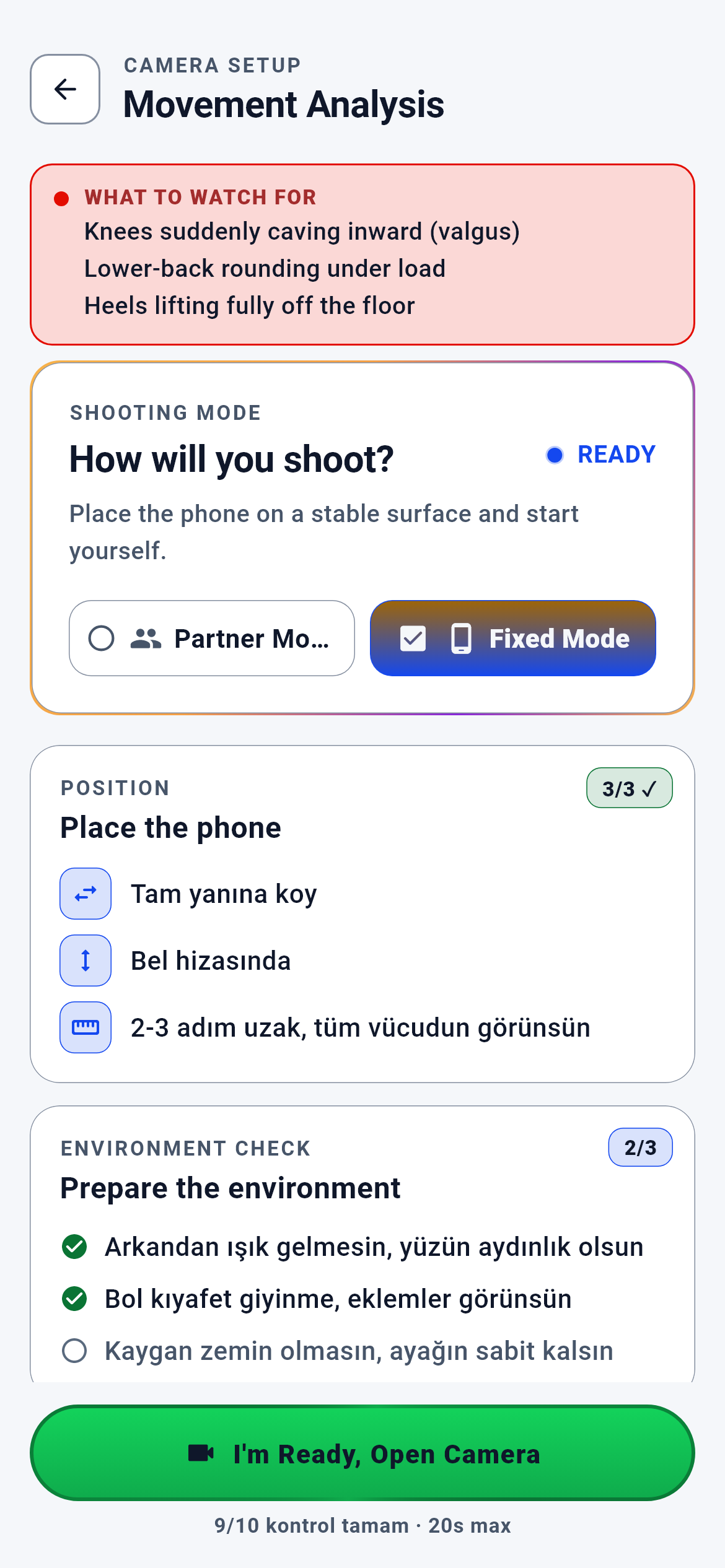
Movement Analysis — Recording Guide · 1/9
The module’s entry screen. You arrive here by choosing "form analysis" from a movement card in the exercise library or from a set row on a training day.
You choose a recording mode, read where to place the phone and open the camera when you are ready.
- "I am ready, open the camera" → the camera consent screen (first time) → the recording screen
- Back → wherever you came from: the training day, a programme session or the exercise library
What is on this screen 4
Say you open form analysis for the back squat and a red box at the top reads "HIGH TECHNICAL RISK — Knees collapsing suddenly inwards · Lower back rounding under load · Heels lifting fully".
Those three items are the squat pattern’s recorded safety warnings, and the box is drawn only for movements that have them.
The warnings come from the movement’s own rule record: every analysable pattern has its critical joints, expected posture, common mistakes and red flags written in a single table. The squat record has three red flags, and the order on screen is the order in that table. The device does not write, translate or shorten these sentences — it only prints them. For a movement with no recorded warnings the list comes back empty and the box does not appear at all; showing an empty warning box would devalue the warning.
Read these three items before recording: the analysis will look at exactly these, and if one of them comes out at critical level your weekly load increase stops.
The system calls this the "movement form rule record".
Say there are two chips, "Fixed mode" and "Partner mode"; you leave fixed mode selected.
The mode you choose changes the setup instructions and readiness counts below it.
The guide card is read from the intersection of movement pattern and recording mode: nine patterns × two modes = eighteen distinct cards. For the squat in fixed mode it reads "Place it directly to your side · At waist height · 2–3 paces away"; in partner mode the same three lines are written for a partner. The server picks the card, not the device — if the client could pick its own pattern it could pull up the squat guide for a bench press, and the wrong camera angle would make the form score meaningless.
It is normal for the instructions to change when you switch modes; set up for the mode written on screen.
Say the panels carry "3/3 ✓", "2/3" and "4/4 ✓" badges at their top right, with "9/10 checks complete · 20s max" at the bottom.
Those numbers are how full the readiness checklist is; they are counted item by item rather than written by hand.
The placement panel always carries three instructions (direction · height · distance), the environment panel three checks (light · clothing · floor), and the visibility panel as many items as that movement’s own checklist — four for the squat. The environment panel stays at 2/3 because the floor item arrives unticked by default; the 9/10 at the bottom is the sum of the three panels (3 + 2 + 4). "20s max" is the recording screen’s limit: recording stops by itself at the twentieth second.
The badges are reminders, not a score; when they all turn green your recording conditions are ready.
Say you are in the gym’s basement with no signal and you open this screen.
The screen does not draw half a guide: it says "could not be fetched" and does not show the button that opens the camera at all.
This screen asks four questions at once — is the movement analysable, what does its card say, what are the readiness counts, are there safety warnings. All four collapse into one decision, and if even one is missing the decision is "do not draw". The reason: allowing a recording while the safety warning could not be fetched has the same effect as never showing the warning. You would enter a risky movement unwarned and never notice the omission.
If you see this screen there is nothing wrong with your setup; press "retry" once your connection returns.
The system calls this "fail-closed" behaviour.
Behind the scenes — how the system decides 5
Reading the movement from 33 points
Say you recorded a 20-second squat set and the app says it read your movement. What exactly did it read?
A frame is taken every 1.5 seconds and 33 body points are extracted from it: shoulder, elbow, wrist, hip, knee, ankle and the rest.
Point extraction happens on the phone itself — no internet needed and no extra cost. The resulting coordinates are image pixel coordinates and each point carries a confidence value. For the squat only six of those 33 points enter the measurement: hips, knees and ankles on both sides. The engine computes the left and right chains separately, then locks onto ONE side for the whole clip — the side nearer the camera. The lock matters: choosing a side frame by frame would take a measurement from the left leg in one frame and the right in another, and the "lowest knee angle" would be a mixture of two different legs.
Measurement quality depends on framing: the hip–knee–ankle line on the side nearest the camera must be clearly visible.
The system calls these "pose detection" and the "side lock".
Turning a joint angle into a score
Say your knee angle at the bottom measured 115 degrees and you saw 85 points. What links the two?
The smallest knee angle falls into a depth band and that band’s penalty is deducted from 100.
The boundaries are two numbers: if the smallest knee angle does not exceed 100 degrees the depth is full, if it does not exceed 130 it is partial, above that it is shallow. 115 degrees falls into the second band and 15 points are deducted. A left–right difference is added on top: if the hip-height difference relative to torso length exceeds 5%, another 15 points come off. These thresholds are provisional values awaiting calibration and are written as such in the code — no claim is made that they are a validated clinical scale. If the measurement is unreliable no score is given at all, because writing a number for something you could not measure is the most dangerous error.
The way to raise your score is not more repetitions but one deeper, more symmetrical repetition.
The system calls this the "depth band".
A critical fault → load progression stops
Say your knees collapsed markedly inwards at the bottom of a squat and the analysis flagged it as critical. What happens next week?
If there is even one critical observation, that movement’s weight does not increase — regardless of your score.
The analysis result goes to the training engine as a progression signal with two parts: a type derived from the score (85 and above excellent, 70 and above continue normally, 55 and above hold the weight, 40 and above work on technique, below that reduce the load) and a separate "block progression" flag. The flag is raised unconditionally when there is a critical observation. When the weekly plan is built this flag is read first — BEFORE the RPE, completion-rate and rest-duration rules. With the flag raised the decision is "hold"; if the score is below 40 it becomes "reduce the load". On a hold the weight stays the same; on a reduction the load drops 10% and is rounded to the nearest 2.5 kg step on compound movements.
When you see load progression stop, the cause is not your strength but that set’s critical technical fault; fix it and the increase returns the following week.
The system calls this "block progression".
Clean form → +2.5 kg
Say the form analysis found no critical fault and you finished every set that week at the top of the rep band.
2.5 kg is added on compound movements and 1.25 kg on isolation movements in the following week’s plan.
The increase passes two gates. The first is movement form: with the block-progression flag raised the decision is already "hold" and an increase is never discussed. Without the flag, the second gate is your performance — completion rate and rep accuracy must clear their thresholds, load must not have dropped, rest must not have been overrun. If both hold and you finished your reps at the top of the band, the weight rises; if you were not at the top, the weight stays and your target moves up by one repetition. On bodyweight movements the increase is a rep target, not a weight.
The shortest route to earning a load increase is keeping your form clean: a technical fault is read before your completion rate.
Capture thresholds coming from the server
Say during recording you see "SKELETON · LIGHT · PHASE" chips and a rep counter on screen; one day they do not appear at all.
The chips and the counter are deliberately not drawn when the measurement thresholds cannot be fetched from the server; recording still continues.
The numbers that light these chips are a measurement policy: what degree the knee angle must pass for a repetition to count, at what confidence a point counts, at what confidence the skeleton chip turns green. The policy lives in one place and the same numbers feed both the live chip and the evaluation at the moment you stop. Falling back to an old number on the device when the thresholds cannot be fetched is forbidden: if the server tightened the policy, the old number would light the chip green, you would carry on thinking "the recording is good" and be rejected at the end. A wrong green is worse than no chip at all. What is lost is the live assistant — not the form analysis itself.
On a recording where you cannot see the chips, move normally; the measurement still happens at the moment you stop.
The system calls this a "fail-closed display".
What your data is for 5
Camera consent
If you provide it Camera-based movement analysis opens: you can record, get a form score and see it reflected in the load decision in your plan.
If you skip it The whole module stays closed. You see the guide screen but the camera does not open; without consent no frame is processed and no analysis is produced. The rest of the app — plan, library, nutrition — is unaffected.
The right camera angle (phone directly to your side)
If you provide it The knee angle is measured with confidence, the score arrives with the "measured" badge, and the same recording always gives the same score.
If you skip it The analysis stops before it starts and asks you to record again. When the camera’s side-view confidence falls below 0.5 the request is never sent to the AI — rather than inventing a score from an unmeasurable angle, no score is given.
Full-body framing and at least one full repetition
If you provide it The quality gate accepts the recording, key frames are selected and the analysis begins.
If you skip it The recording is rejected and the screen states which condition failed. For the squat the "full repetition" criterion is explicit: the knee angle must change by more than 30 degrees during the recording. A half repetition, or feet outside the frame, stops the analysis from the start.
Recording the same movement regularly
If you provide it Your range of motion is compared with the previous analysis, a strip of the last three analyses appears at the bottom of the result screen, and the engine can make a long-term learning assessment.
If you skip it Every analysis stands alone: no comparison is drawn on the range-of-motion line, the history strip never appears, and an exclusion recommendation is never produced — because the evaluation requires at least six analyses in a six-month window.
Logging your training sets in the app
If you provide it The form signal combines with real performance data; the load decision is made from both your technique and your completion rate.
If you skip it Your form score stays on screen but its counterpart in the plan weakens: the load decision runs on inputs such as completion rate, rep accuracy and rest duration, and those come from your set logs. With no logs, all the engine has left is the block flag.