
MarketCOMING SOON
What you see on the shelf comes from your own data: your goal, level, meal log and health declaration decide which product surfaces — then cart, payment, delivery and refund all run under one roof.
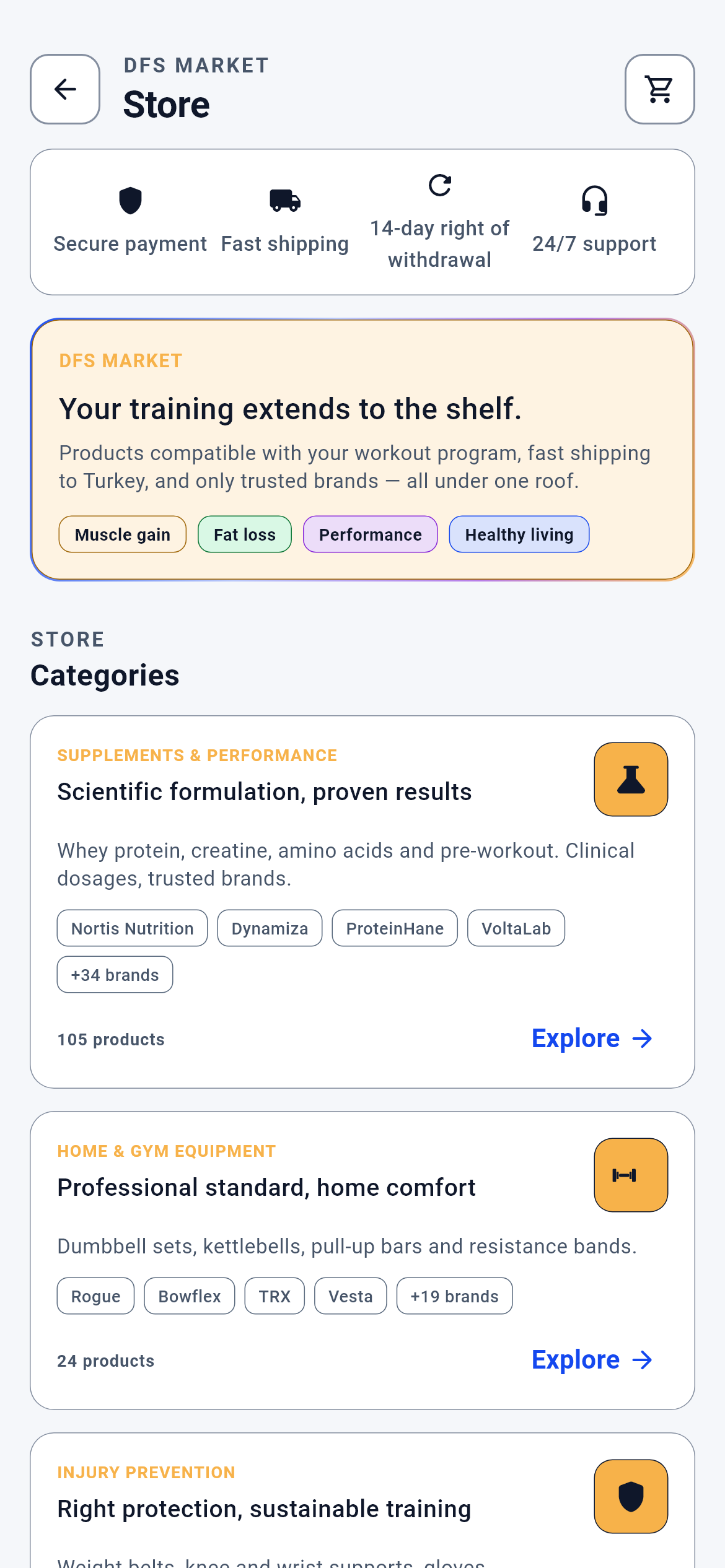
Store · 1/12
The market’s main screen. You land here via “See all” on the dashboard’s market strip, or by tapping a product card and coming back.
You pick one of two routes: browse by category, or work down your personal shelf below.
- The back arrow at the top left → Dashboard
- The cart icon at the top right → Cart
- “Explore” on a category card → that category’s hub
- The personal shelf cards below → the product’s detail page
What is on this screen 5
You open the store. Four small icons sit at the top: secure payment, fast delivery, 14-day right of withdrawal, 24/7 support.
That strip is not a promotion but a fixed trust line stating the terms of shopping here.
The screen’s order is fixed and does not vary with content: trust strip → brand card → categories → personal shelf → feedback → store promise. A fixed order builds habit; by the third visit you scroll to the right place without looking.
If something you are looking for is absent, it has not moved; that section’s condition simply was not met.
The system calls this a “stable information architecture”.
A category card reads “105 products” with four brand badges beneath it.
Both the count and the brands are counted from the catalogue; neither is written by hand.
The root categories and each one’s product count are computed from the catalogue when the screen is first built, and their order is locked to each category’s own sequence number. So as the catalogue grows the card updates itself — nobody has to bump a number somewhere by hand.
Seeing “0 products” in a category is not a fault; that category really is empty.
The system calls this a “derived count”.
A cart icon sits at the top right. For a while there was no cart icon here at all.
Whether the purchase route is open hangs on a single switch.
With the switch off the cart icon is not drawn, the product detail says “View details” instead of “Add to cart”, and the cart and payment routes redirect back to the store. The switch was turned on on 2026-08-04 because a real payment and a real refund were to be attempted with a real card; the contract for the off state was not deleted and lives on in tests.
If you can see the cart icon the purchase route is open; if you cannot, the app is not broken — that route is closed.
The system calls this a “feature flag”.
You signed in from abroad and instead of the whole store a single “coming soon” panel appeared.
Whether the market is open is decided by country policy.
The policy is asked of the server the moment the screen opens. If an unrecognised value comes back, access is not upgraded but treated as locked — a corrupted or tampered response cannot open the market. If the network answers not at all, the last known policy is kept.
The lock does not mean “you may not enter”; it means the sales pipeline is not yet set up in that country.
The system calls this a “whitelist guard”.
Other modules open with a coach box; the market does not.
A single coach box speaking for the whole page is deliberately absent from the top of the market.
Here there is something being sold next to the sentence. A blanket recommendation at the top of the screen reads as though it were given for all 64 products — whereas the judgement is made per product. So on the market the AI speaks INSIDE the card, and each note explains only its own product.
To learn what the system thinks about a product, read that card’s own sentence.
In product terms this is “per-product judgement”.
Behind the scenes — how the system decides 10
What reaches your shelf — 1/4: where your segment comes from
At sign-up you entered your goal as “fat loss”, your level as “intermediate” and your sex as “male”. Where does the shelf read these from?
Your segment is born of three fields: your training goal tag, your level tier and your sex.
All three are read from your profile spine — the single record where onboarding and profile edits converge. The mapping is one-to-one: goal tag `fat_loss` → fat loss, `muscle`/`toning` → muscle, `strength` → strength, `health` → health; level `L1` → beginner, `L2` → intermediate, `L3`/`L4` → advanced. An unrecognised or empty value does not fall into a silent assumption: sex drops to “unspecified”, goal to “health”, level to “beginner”. The segment is derived on the server; there is NO segment field in the request body, because the segment is the strongest arm of the scoring and a client able to write it would choose for itself which products reached the shelf.
If your shelf feels foreign, the first place to look is the goal and level in your profile; fix those and the shelf changes on the next load.
The system calls this the “profile spine”.
What reaches your shelf — 2/4: what the phone sends, what the server builds
When the shelf request goes out, what does the phone tell the server, and what does it not?
The phone carries only catalogue context; the server builds the decision’s inputs from its own store.
Sent: the catalogue’s product ids, product tags, the product→sub-category and sub-category→root-category maps, the week key, and what was shown and bought this week. Not sent, and why: (a) THE ACTIVE PROMOTION LIST — a promotion bonus is a discount entitlement; a phone sending a fabricated promotion could award its own product both points and a badge; (b) THE SEGMENT — the strongest arm of the scoring; (c) THE SAFETY FLAGS (pregnancy / breastfeeding / age / blood thinners) — whoever writes the decision would also open the gate; (d) CARDS PER CATEGORY — fixed on the server; sendable, a legitimate eight-item request would turn into a load computing the whole catalogue. These four fields are not constructed in the request body even as empty values.
Updating your health declaration narrows the shelf immediately; that is not a restriction but the decision having been taken out of the phone’s hands.
The system calls this “server-authoritative input”.
What reaches your shelf — 3/4: if the eight rails slip out of order
If apparel cards appeared under the “Supplements” heading, no counting test would catch it: 8 sections, 64 cards — the counts right, the pairing wrong.
The response is unpacked without trusting order ALONE; each section’s id is compared against the category asked for.
The endpoint returns an answer in the same order and of the same length as the category list asked for. The client makes two independent checks: does the count match, and does each section’s category id match what was expected. If either fails, NO section is served — there is no partial acceptance, because even with seven of eight rails correct, the wrong one is the rail where the user sees the wrong product. If the category list exceeds the ceiling the client closes without going to the network at all; silently truncating would lead you to take the last rails for “no products”.
The shelf either arrives correct as a whole or does not arrive; you never see half a shelf.
The system calls this an “identity-checked batch response”.
What reaches your shelf — 4/4: how a slot gets filled
The first card on the supplement rail reads “Need”, the second and third “Promotion”, the rest “Discovery”.
Each slot is filled by a priority chain, and which arm filled it is written onto the card.
The chain runs: (1) if there is a measurable need signal, that product; (2) failing that, an active promotion targeting your segment; (3) failing that, segment-general discovery; (4) failing everything, deterministic fill by catalogue order. The server does the classification and attaches it to the card; the device derives nothing. A product that must be suppressed never becomes a card at all — the card object has no “do not show” state, that product simply never enters the list.
If your shelf is all “Discovery” badges, the system found no measurable signal about you: logging meals and workouts turns the shelf towards the need side.
The system calls this “priority slot fill”.
Who sets the price — the winning offer
Several sellers list the same product. One price appears on the card; who chose it?
The server picks the winning offer; the phone reads no offer store.
Reading a device-side copy of offers would produce a second truth diverging from the store, even if the value read were never used. The service hands over only a list saying “I am asking about these products”. Because the endpoint accepts at most fifty products per request, the list is split into batches of fifty and the batches are joined in order; splitting does not change the decision, since the winning offer is picked per product. If even one batch comes back closed, an exception is thrown and the page is not drawn with priceless cards.
Not seeing a price on a product does not mean “out of stock”; it means the pricing decision could not be made at that moment.
The system calls this a “fail-closed buy box”.
From cart to order — at which step the money settles
The cart reads ₺1,109.20 and the order summary shows the same figure. Why are they always the same?
There is one place that produces the amount: the checkout preview endpoint.
Both the cart and the order summary ask the same endpoint; tax, delivery and discounts are computed there. The cart multiplying on its own would produce a different figure at the payment screen and leave you unsure which to trust. If the preview cannot be fetched, the cart shows a subtotal from line prices but marks it “Estimated” — an unmarked estimate would read as a final figure.
If the cart and payment amounts differ, the gap is delivery or a coupon; both are itemised in the payment summary.
The system calls this the “single pricing authority”.
What stops the same order being created twice
Your connection dropped during payment and you tried again. Did two orders get created?
Every order-creation call carries a unique key, and if the same key arrives again the server returns the same order.
The key is tied to a single tap rather than the button’s state; a request arriving with the same key within twenty-four hours is treated as a repeat. There is a second protection on top: retrying an order id already paid in this session takes the screen straight to success, and retrying one that failed takes it straight to the error screen — in neither case is a new call made.
If a payment stalled, do not open a new order; continue from My Orders with “Complete payment”.
The system calls this an “idempotency key”.
Order status is read from a code, not a word
The screen reads “Shipped”. Where does that word come from, and what happens when you switch to English?
The server sends a status CODE; the word on screen is produced from that code.
The codes are kept in a fixed list and the mapping is done in one place. If an unrecognised code arrives, no status is invented: it falls into an “unknown” bucket and that order appears not in the narrow tabs but only in “All” — because filing an order whose stage we do not know into a tab would be a lie, while hiding it from the list would erase an order that may already be paid for.
Change the app’s language and the order stays in the same tab; the tab looks at the code, not the word.
The system calls this “code-driven status”.
Return or issue report — why the two are separate
You have the product but the box arrived crushed. Should you open a return or report an issue?
A return deals with money; an issue report deals with the order itself.
A return opens only on a delivered order and starts a refund process; its record is written inside the order record and a second pending return cannot be opened for the same order. An issue report falls into one of four fixed headings, goes to the support queue and requires no delivery — if a parcel is lost in transit no return can be opened, but a report can. Put in the same box, a user reporting a delivery problem would land in the refund queue.
If you want your money back, open a return; if something went wrong with the order itself, report an issue. There is a link from the return screen to issue reporting and back the other way.
In product terms this is “separate responsibility, separate queue”.
The shelf’s weekly rhythm — why it does not change daily
The shelf you looked at in the morning is the same in the evening. The next week it has changed.
The shelf is tied to a week key and stays fixed within the day.
A shelf computed within the same week is written to the ledger and not asked for again; a shelf that changed on every open would leave you unable to find a product you saw yesterday. The ledger is invalid in two cases: you bought a product in the meantime, or a product became ineligible at the safety gate — for instance if you just ticked a pregnancy declaration. Then the ledger is cleared and the shelf is rebuilt.
If you want your shelf to change immediately, update your profile or health declaration; an ordinary reopen will not change it.
The system calls this “weekly caching with invalidation”.
What your data is for 7
Your goal (fat loss / muscle / strength / health) and your level
If you provide it Your segment is born of these two fields and the shelf’s 64 cards are scored against it; the category mix shifts with your goal too.
If you skip it The segment quietly falls to “health + beginner + unspecified”. The shelf is not empty but it is not yours: what you see is the shelf of a user the system does not know.
Your health declaration (pregnancy / breastfeeding / blood thinners) and your age
If you provide it Unsuitable supplement categories never reach the shelf; the filtering happens at product-id level and on the server.
If you skip it The gate then decides from the age and profile data in the spine alone. If the gate cannot be reached at all, the shelf stays EMPTY and reads “could not be checked” — showing nothing was chosen over showing products with incomplete safety information.
Your meal and training records
If you provide it Measurable need signals emerge (a protein shortfall, a recovery load) and the shelf’s slots fill with “Need”-badged cards.
If you skip it The need arm never fires; the slots fall to the promotion and discovery arms. The shelf still arrives full but is built for your segment rather than for you — the badge on the cards tells you which.
Your delivery address
If you provide it The address card on the order summary fills and the primary button goes straight to payment.
If you skip it The button opens address management instead of payment. Because the order-creation call is made with an address id, no order can be built without one.
The offer→product mapping created when you add to cart
If you provide it The cart line shows the product name, brand and price; the mapping survives the app closing.
If you skip it A product id is written in place of the line’s name. That is not data loss but the ledger being empty for that line: removing and re-adding it establishes the mapping.
Your return reason (at least ten characters)
If you provide it The request is sent, attached to the order record and appears in the returns list with its status.
If you skip it The submit button does nothing and you are spared a pointless wait. Because a short reason leaves the person reviewing the return with nothing, the process is not allowed to start either.
Your country policy (the market access state on the server)
If you provide it The store opens in full: categories, the personal shelf and the cart route are all drawn.
If you skip it If an unrecognised value comes back, access is not upgraded but treated as locked and a single information panel appears instead of the store. If the network answers not at all, the last known policy is kept.