
Your dietitianCOMING SOON
Once a month, a written review from a real dietitian who has read your own nutrition log. The package is not open yet; what is ready today is the screen itself and your vote on the opening order.
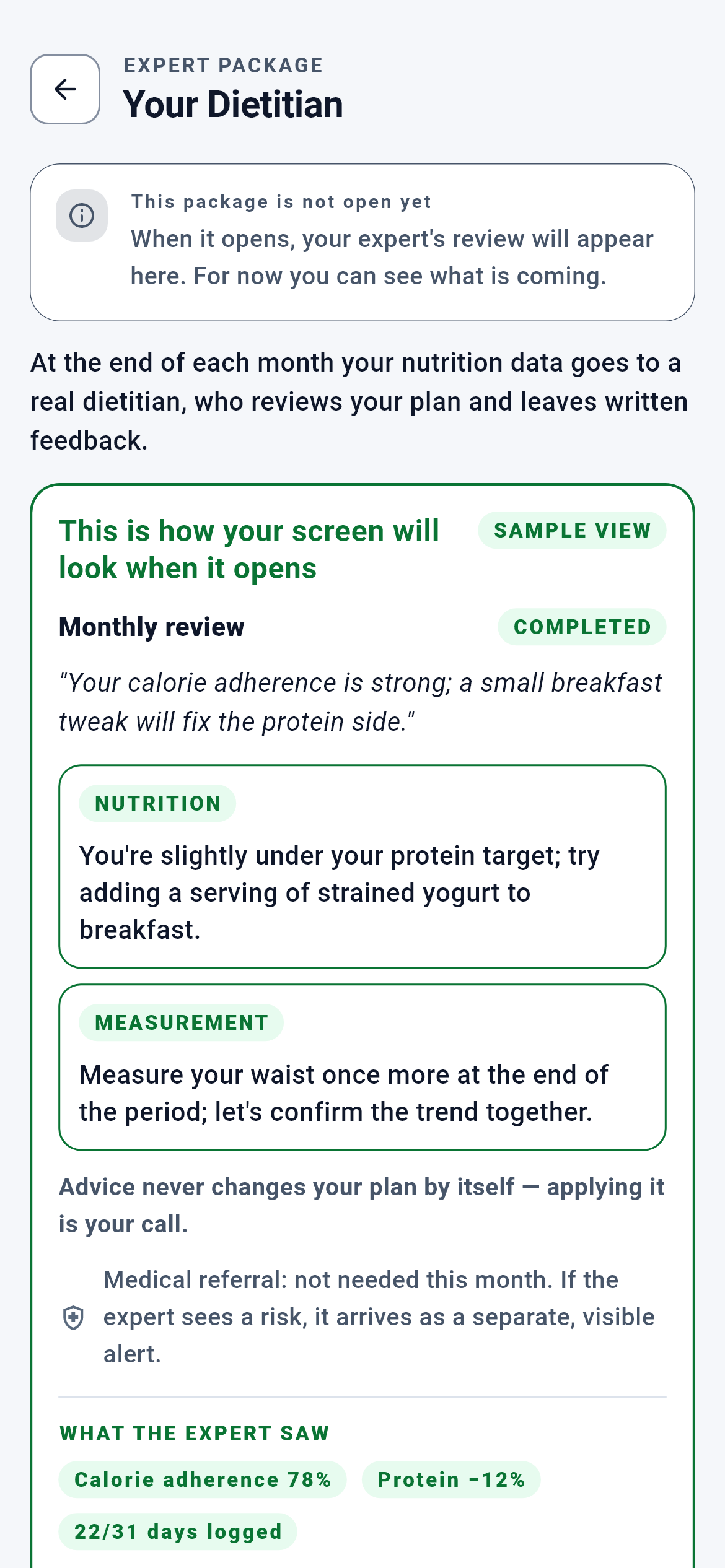
Your dietitian · 1/3
The expert screen you enter from the Dashboard. Its address is `/uzman/diyetisyen`. Because the package is not open, this is currently a display case: it shows what the package will do, it does not yet connect you to an expert.
You see what the screen will look like once it opens, and you vote on the opening order with the button at the bottom of the page.
- Dashboard — the back arrow at the top left
- Your vote is written to the server; the screen does not change, the button switches to its pressed state
- When the package opens, this same address will connect to the real expert screens; the address will not change
What is on this screen 5
Say you tap the "Your dietitian" tab on the Dashboard and see a grey box at the very top: "This package is not open yet".
The screen tells you it is closed before you even begin reading.
The tab could have behaved in two ways: greyed out and untappable, or open and showing what it is. The second was chosen — but the moment you start showing something, the impression "this can be bought now" appears. That is why the notice is not tucked between panels but sits at the very top, first in line. Everything below is read underneath that sentence.
There is no point looking for a place to sign up, pay or choose an expert on this screen; there is none. The only thing you can do is the vote at the bottom.
The system calls this a "locked display case"; the lock means "not open yet", not "you may not enter".
Say you look at the green-framed box under the notice; its corner reads "SAMPLE VIEW" and inside there is a card titled "March review".
That box is the very screen you will see when the package opens — filled with sample data.
Description asks you to imagine; demonstration lets you recognise. But if what is shown were invented, the screen would be selling work the product does not do. Every field inside the box maps to a field of the review record on the server: the period title, the status badge, the single quoted sentence, the tagged advice cards, the medical-referral line and the summary chips at the bottom. The inside of the box is also non-interactive — a button that does not work cannot be made to look as if it does.
The line under the box — "The data in this section is a sample; it belongs to no one" — is not a removable notice but bound to the frame itself. If the frame is there, so is that line.
The system calls this the "demo frame".
Say you look at the two advice cards in the sample review: one tagged "NUTRITION", the other "MEASUREMENT". You look for a training-related card and cannot find one.
A dietitian cannot write you a training recommendation; the server does not accept that tag.
The tags each profession may write are held as a closed list on the server. For a dietitian that list is nutrition, recovery and measurement. For a trainer it is training, recovery and measurement — so the shared ground is open to both, while each profession’s own ground does not cross over. A suggestion sent with the wrong tag is rejected. This is not a UI choice: even if the screen let it through, the server does not.
If you also want an expert opinion on the training side, there is a separate package (Your trainer). A sentence such as "train one more day per week" coming from your dietitian cannot be produced by the system.
The system calls this the "scope-of-practice boundary" — professional responsibility written into code.
Say you read the bold line under the advice cards: "Advice does not change your plan by itself — applying it is your call." Then you look for an "Approve" button.
There is no button, and deliberately so.
There is no endpoint on the server that writes an expert’s advice into your nutrition plan. Advice does not change the plan by itself. Putting a fake approve button in the demo would have sold a flow that does not exist — and at the most critical point of all: the user’s question of "who can change my plan". The rule is stated in text, not with a button.
If you want to act on the advice you make the change yourself: swap a meal from the nutrition screen or rebuild your plan. What the expert wrote is an opinion, not an instruction.
Say you see a line with a shield icon in the sample review: "Medical referral: not needed this month."
The medical-risk notice is not buried inside the advice text; it stands as a separate line that appears every month.
The product does not give medical advice. When an expert sees a risk, it needs its own channel: written into the middle of an advice paragraph, you could miss it and the product would slide into the position of "having given advice". That is why there is a separate flag on the server. When the flag is raised, a short reason is mandatory — a bare "see a doctor" would only frighten.
This line appears every month. "Not needed" does not mean the expert did not look at that area; it means they looked and saw nothing.
The system calls this the "separate channel" — so risk never gets mixed into advice.
Behind the scenes — how the system decides 8
The calorie target — where the line the dietitian measures against comes from
Say you are 32, male, 178 cm, 82 kg; your goal is fat loss and you train four days a week. You open your nutrition plan and see a daily target of 2040 calories.
That number is built in three steps: your resting metabolism, your activity factor, then the deficit for your goal.
The first step is the Mifflin-St Jeor equation: 10×82 + 6.25×178 − 5×32 + 5 = 1777.5 calories. That is what you would burn without moving at all. The second step is the activity factor: if your occupational activity is unknown it starts at 1.25 and 0.025 is added per weekly training session — +0.10 for four days, so 1.35. 1777.5 × 1.35 = 2400 calories of daily expenditure. The third step is the goal: fat loss applies a 15% deficit, 2400 × 0.85 = 2040. There is also a floor you cannot go below; 1500 calories for men. When the deficit would pierce the floor, the target is pulled back up to it.
The "Calorie adherence 78%" the dietitian sees comes from dividing by exactly this 2040 — 78% means you ate an average of 1591 calories a day. When the expert says "you are eating too little", they are looking at the line your own engine drew, not at a hunch.
The system calls this the "daily energy target"; it passes through the BMR, TDEE and goal-deficit layers in that order.
The protein target — the number behind the "Protein −12%" chip
The same person: 82 kg, fat-loss goal. Their nutrition plan shows a protein target of 180 grams a day.
On a fat-loss goal protein is set at 2.2 grams per kilogram: 82 × 2.2 = 180 grams.
In a calorie deficit the body loses muscle along with fat; keeping protein high limits that. The multiplier varies by goal — 2.0 for muscle gain, 1.8 for endurance, 1.3 for general health. If body mass index is above 30 the calculation uses adjusted rather than actual body weight, because fat tissue does not create a protein requirement. In this example the index is 25.9, so actual weight is used. There is an upper bound too: 300 grams. And if the target calorie budget cannot carry protein, minimum fat and minimum carbohydrate at the same time, the multiplier is stepped down from 2.2 towards 1.2.
The "Protein −12%" the expert sees says you stayed below those 180 grams: an average of 158 grams a day. The "add a portion of strained yoghurt to breakfast" advice in the sample review is aimed at exactly that gap.
The system calls this "macro allocation"; protein is set first, fat second, carbohydrate from what remains.
How the target reaches the expert — from engine to summary
Say you refreshed your plan this week and your target settled at 2040 calories. Where will your dietitian see that number at the end of the month?
The target is written into the weekly plan row when the plan is saved; the summary reads it from that row at month end.
The engine computes on the phone or on the server, but the table the expert sees may be assembled months later. Re-running the computation at that moment would mean recalculating a past month with today’s body weight — the line the expert sees would diverge from the line you saw that month. So the target is written into the weekly plan record the moment it is produced, and the summary reads from the latest weekly plan. The adherence percentage comes from dividing the month’s average daily intake by that target.
If you never produced a plan, the target row stays empty and the adherence percentage cannot be computed. The expert still sees how many days you logged that month, but cannot answer "where do you stand against your target".
The system calls this a "snapshot"; the computation is not repeated, the written value is read.
Freezing the summary — what the expert was looking at
Say your dietitian wrote the March review in early April. Through April you took measurements and lost weight. In May you go back and reread the March comment.
The numbers in the March summary are still March’s numbers in May; April’s change does not alter them.
When the period record is opened, the summary is produced once, written inside the record and never recomputed. Recomputed later, the table the expert saw would diverge from the one you see, and the question "what were you looking at when you wrote this?" would have no answer. The same logic applies to the comment itself: a review is written once and cannot be changed after it is sent. Text that changes after you read it would produce the "you did not write that to me" situation.
Your past reviews stand like a logbook. In later months you can compare for yourself whether you acted on a piece of advice.
The system calls this a "state machine"; each period has one immutable answer.
The shape of the expert’s output — one sentence, at most three pieces of advice
Say your dietitian wanted to write you a three-page report.
They cannot: the summary is cut at 500 characters, each piece of advice at 300, and the number of pieces is capped at three.
Free text breaks four things at once. Quality swings from expert to expert — one writes three sentences, another three pages. Long text is not read on a phone, and advice that is not read is not advice. Which advice was given and whether it held becomes unmeasurable. And unbounded text opens the door to unbounded claims. More than three pieces devalues the advice itself: you would not know which to start with.
What you receive is not a long report but a direction reduced to three items for that month. Next month brings three new ones.
The health declaration — if it cannot be read, the section is not shown at all
Say that while connecting to a dietitian you tick the box "I also agree to share my health data (conditions/medication) with this dietitian".
Your health declaration travels only to dietitians, and only through a separate permission that opens when you tick that box.
Health data is a special category; establishing the relationship is not treated as sufficient consent for it, and a separate, explicit checkbox is required. The box appears only when a dietitian is chosen — a trainer cannot be given this permission. If ticked, a separate entry is written into the consent ledger and four flags are produced in the month-end summary: cardiac, metabolic, orthopaedic and medication. Those flags are stored encrypted in the database; if even one cannot be decrypted, the entire health section is withheld. The reason: a partially read flag looks like a "no", and the expert would think an existing condition does not exist. Half information is more dangerous than none.
When you end the relationship this permission is stamped automatically; you do not have to withdraw it separately. If you never tick the box, your dietitian sees the nutrition and measurement side but not the health side.
The system calls this "separate consent for special-category data".
How the health constraint protects the plan — a gate that runs without any expert
Say you declared a metabolic condition in your profile and waited for a nutrition plan to be produced.
Without medical clearance no plan is produced at all; the engine raises an exception and stops.
Four declarations close this gate: cardiac, metabolic, orthopaedic and medication. If one of them is ticked and medical clearance has not been given, plan production stops — no "good enough" plan is issued for a risky profile. Once clearance is given the plan is produced, but the declaration is not forgotten: it continues to be carried as a warning flag; it does not change the engine’s decision, it only shows in the interface. Allergies sit in a different layer and act more strictly: a food containing an allergen you declared is removed from the candidate list outright and never enters the plan.
This gate is independent of the dietitian package and already runs today. A dietitian does not remove or loosen it — the expert comments on top of a plan the engine already protects.
The system calls this the "health gate"; its counterpart on the allergy side is the "food constraint filter".
Skipping a month — the relationship does not end
Say you had a busy month, could not keep logs, and do not want that month reviewed.
You can skip that period; the relationship continues, only that month is not reviewed.
If reviews were mandatory, the expert would have to write something even for a month with no data — a comment with no ground is not a comment. That skipping does not end the relationship is deliberate too: skipping a month is not "I am quitting". There is one limit: if the expert has already written the review, that period can no longer be skipped, because work already done is not taken back.
The month you skipped does not affect the next period; a new month starts with a new record.
What your data is for 6
Your daily nutrition log (what you ate)
If you provide it The month’s average calories and protein are computed; the "calorie adherence" and "protein deviation" ratios the dietitian sees come from here. How many days you logged also travels to the expert and shows how solid the ground under their comment is.
If you skip it The expert sees "0/31 days logged" and finds nothing to comment on for nutrition. A review can still be written, but it rests on your measurements alone.
Your nutrition plan (weekly calorie and protein targets)
If you provide it It creates the line your intake is compared against; the adherence percentage and protein deviation can only be computed by dividing by that target.
If you skip it The target row stays empty and neither ratio can be computed. The expert sees no ratio at all — there is no yardstick for "are they eating too little or too much".
Your body measurements (waist, hips, neck, chest, arm, leg, weight)
If you provide it Your latest measurements at the end of the period, that month’s Body Form Analysis result and the change against the previous month travel to the expert. If you took at least two measurements within the month, your weight change becomes visible too.
If you skip it The measurement section stays empty. Your dietitian can only comment on the nutrition side; they cannot give a warning such as "your weight is dropping but so is your lean mass".
Your health declaration (conditions and medication)
If you provide it If you ticked the separate consent box, four flags travel to the dietitian and they write their advice knowing them.
If you skip it The health section is never produced. Your nutrition plan is still protected — the plan gate runs independently of this declaration and issues no plan for a risky profile without medical clearance.
Your sharing permissions (nutrition · measurement · health)
If you provide it The queries for the categories you opened run and those sections enter the summary. The list of which categories were included also travels to the expert.
If you skip it No record means no permission — it counts as closed. A closed category’s queries never run and that data is not produced. If you withdraw a permission later, the record is not deleted but stamped.
Your vote on the opening order
If you provide it A record is written for the dietitian area and folded into the data that decides which area opens first.
If you skip it The order is decided by other people’s usage data. Not voting does not close the package; it only leaves your preference out of the measurement.