Frequently Asked Questions
Every one of the 721 answers carries two badges: how strong the evidence behind it is, and how much caution the topic demands. You know how much to trust an answer before you read it.
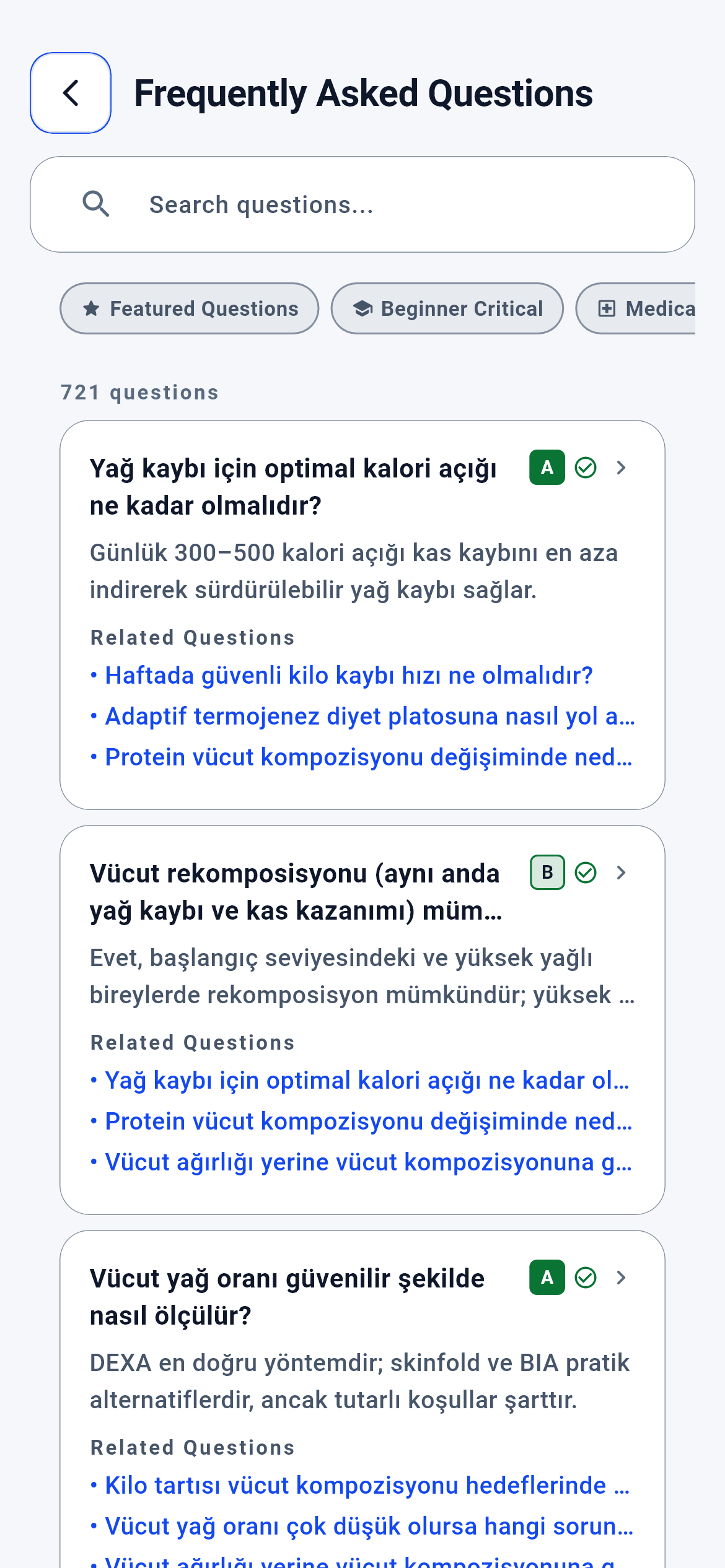
Frequently Asked Questions · 1/7
The module’s entry screen. You get here from the tools box on the home screen (dashboard_build_sections_part.dart:516) or the FAQ row on the Help screen (help_screen.dart:120). The module has exactly one sub-screen: the answer page that opens when you tap a question.
You type your topic into the search box at the top or narrow the list with the filter chips, then tap a question to open its answer.
- A question card — that question’s answer page, /faq/<question-id> (faq_v2_screen.dart:286-292)
- A locked question card — the subscription page; the answer does not open (faq_v2_screen.dart:288)
- Back — the screen you came from; the home screen if you opened this directly (ky_navigation.dart:24-33)
What is on this screen 5
Say you are reading the first card in the list: “What is the optimal calorie deficit for fat loss?”, with a single letter “A” in a dark green box to the right of the question.
That letter tells you how strong the scientific evidence behind the answer is: A is strongest, then B, C, D; content with no source shows a question mark instead of a letter.
The letter is not computed on screen — it is written in each question’s own record and read from the content file. The colour is not arbitrary either: A, C and D are filled while B is outlined, so the level is conveyed not by hue alone but by a filled/outlined distinction. That way two levels never blur together for a colour-blind user or on a low-contrast display.
Look at the letter before you read a question. With an A you can apply the answer as it stands; with a C or D, treat the answer as a starting point and test it against your own situation.
The system calls this the “evidence level”.
Say there is a small icon just to the right of the letter: a green tick on some cards, a blue “i” on others, a red hospital mark on some.
That icon shows how much caution the topic demands and carries one of six levels.
The levels sit in a single mapping table: safe general information gets a green tick, context-dependent information a blue “i”, a topic carrying health or supplement risk a yellow triangle, a topic requiring medical advice a red hospital mark, unverified content a purple prohibition sign, content needing rework a grey bin. Because the table lives in one place, the same level gets the same icon on every card — the icon is not the card’s own choice.
On a question with a red hospital mark you can still read the answer, but ask your doctor before acting on it. The icon is a stop sign, not a ban.
The system calls this the “risk level”.
Say some cards have a “Related questions” heading with three blue lines under it, while other cards have no such section at all.
Those three lines are the titles of neighbouring questions written by hand in the question’s own record.
The list screen does not find neighbours itself: it reads only the ids written in the question’s record, drops the question itself from the list and shows what it can resolve. For a question with no neighbours written down, the section is not drawn — the system does not invent a link by guessing similarity. The number of visible lines is capped at three, because a card is not a table of contents.
Those lines are not tappable; the card itself is. Use them as a “what comes next after this answer” list.
The system calls this the “related question graph”.
Say just under the filter chips, in dim grey, it reads “721 questions” and you have typed nothing yet.
That number is how many questions are listed on screen at that moment — not the archive total but the count that passed the filters.
The number is read from the list’s own length rather than being fixed text. With no filters the whole archive enters the list, so on first open it equals the archive size. Tap a chip or type a search and the same line shows the new count — you never have to count results to see how much the filter narrowed things.
After typing your search, look at this line: if the number is still three digits your query is broad; a single digit means it is too narrow. Use the number as a feedback gauge.
The system calls this the “result count header”.
Say you scroll down and the questions run “Fat loss… → Body recomposition… → Body fat percentage…”; the most popular question is not at the top.
The list is ordered by sorting the questions’ id codes alphabetically.
The sort happens once where the content file is read and produces the same result on every open. Popularity and vote counts do not enter the ordering; if they did, the same question would sit in two different places on two phones and the “I cannot find it again” problem would appear. A fixed order makes finding the same question a second time learnable.
If you are after a specific question, do not scroll — use the search box. The list is a discovery surface; its order is not a recommendation ranking.
The system calls this “deterministic ordering by id”.
Behind the scenes — how the system decides 7
How an answer’s evidence level (A / B / C / D) is assigned
Say a new question is being added to the archive and the author puts a meta-analysis citation under the answer.
The evidence level is not computed at runtime; it is written next to the question in the content file and the app reads it and turns it into a badge.
If the app derived the level itself, the same content could get two different badges in two releases. Instead the level is part of the content and two separate rules police it. Rule one: a question at level A, B or C cannot have an empty citation list. Rule two: a question at the no-source level must also have source type “no source”. Both rules run in the individual question’s own validation and in a gate that scans the whole archive; the gate walks the content file line by line and reports offending question ids by name. So the badge is a contract, not decoration.
Looking at a badge, do not wonder who put that letter there. The letter must arrive together with a citation; the two cannot come apart.
The system calls this the “content validation gate”.
Locking the risk level to the medical-warning flag
Say a question is placed at the “requires medical advice” level but the warning flag is forgotten.
Such a question is invalid: at the high-health-risk and medical-advice levels the warning flag is mandatory.
The risk level draws the badge; the warning flag draws the yellow strip inside the card. Being separate fields, one could be set while the other was not — and then you would see the badge but not the warning text. The rule binds them. The same logic exists on the category side: a question in the supplements category must carry the supplement-safety flag, and one in hormones and metabolism the hormone-safety flag. That way someone tapping the “Supplements” quick filter has seen the whole category.
The yellow warning strip and the red risk icon travel together. Where you see one, expect the other.
The system calls this the “cross-field consistency rule”.
Where the content comes from — file, gateway and language choice
Say you switched the app to English and opened the FAQ screen. The questions came up in Turkish.
The content is read from a file embedded in the app; if the English file is not aboard, it quietly falls back to Turkish.
The archive sits in a data file shipped with the app and opens without an internet connection. The screen picks which file to request from the app’s language; if English is requested and the file is missing, no error is shown and the canonical Turkish file is loaded. The reason is the staged translation programme: rather than showing a half-translated archive, the complete Turkish one is shown. Reading the file happens behind a gateway rather than in the screen itself — thanks to that gateway the screen can be tested independently of whether the file is really read, and if the content starts coming from a server tomorrow the screen does not change at all.
The FAQ works on a plane and offline. Seeing a Turkish answer in an English interface is not a bug but deliberate behaviour until translation is complete.
The system calls this the “data gateway” (repository boundary).
What happens when two questions share an id
Say two questions with the same id accidentally entered the content file.
The first one enters the list, the second is skipped and its id is written to a separate duplicates list.
With two records under one id, it would be unclear which one a link opens — and neighbour links would point at the wrong target. So id uniqueness is enforced at load time. The dropped record is not silently ignored; its id is logged so it can be fixed on the content side. The whole list is then sorted by id and arrives in the same order on every open.
You do not see this on screen, but you see its result: a link to a question always opens the same answer.
The system calls this “id uniqueness”.
Quick filters and categories switch each other off
Say you tap the “Beginner” chip, then the “Training” category on the right. The Beginner chip switched itself off.
Only one marker chip or one category chip can be active at a time; the two are never held together.
With both active, two filled chips would show on screen and, on an empty result, it would be unclear which one narrowed things. The single-chip rule ties the result to one cause. The search box is outside this rule: your word works together with the active chip, so with the “Supplements” chip on, search looks only inside supplement questions.
To apply two conditions together, make one a chip and the other a search. Two chips do not work together.
The system calls this the “single-select rule”.
The content reloads on every entry to the screen
Say you leave the FAQ for the home screen and then come back to the FAQ.
The archive is reloaded; no copy left over from the previous visit is used.
The load state is born with the screen and dies when it closes. With a persistent copy, the old archive would stay on screen when the app language changed or the content was updated. There is also a sequence guard for overlapping loads: pressing “retry” twice on the error screen cannot let a late-returning old load overwrite the newer result.
You lose your search and filter when you leave the screen — not a bug but the price of the fresh-content guarantee. Do not leave in the middle of a long search.
The system calls this “auto-disposed screen state”.
What is drawn if the answer text is empty
Say a question’s long answer has not been written yet on the content side and you open that question.
The page is not left empty; the short answer you saw in the list stands in for the long one.
An empty answer panel would give the impression that the question has no answer, when the short answer already exists and is correct. So an empty long answer falls back to the short one. The same defence exists in the source box: empty rows in the citation list are filtered out, and if none remain the box is not drawn at all — not showing the box is preferred over showing one with an empty heading.
When you see a short answer page, the content is not missing but in summary form. With no source box, that answer rests on an internal rule rather than a published study.
The system calls this “defensive rendering”.
What your data is for 4
The word you type into the search box
If you provide it The archive narrows from 721 questions to your topic; the word is searched not only in titles but inside answers and tags, and you do not need Turkish characters.
If you skip it The list shows the whole archive in id order. The screen stays usable, but finding your question means scrolling hundreds of cards — the system does not build a recommendation ranking on your behalf.
The Yes / No vote under the answer
If you provide it The vote is written to your phone and forwarded to the server; returning to the question you see what you voted. "No" votes land in the feedback line for content rework.
If you skip it The answer page keeps working fully; no content is locked. The only thing lost is the content team’s way of learning which answer did not help — a user who does not vote cannot get an answer they found wrong corrected.
The app’s language
If you provide it The language is read as the screen opens and the content file for it is requested; interface text and content come from the same language.
If you skip it If the language cannot be read, Turkish is assumed. With English selected but the English file not aboard, Turkish content is loaded anyway — the screen shows no error and the questions come up in Turkish.
Your account’s subscription status
If you provide it With professional access all 721 questions open and search works inside the answer texts as well.
If you skip it The 40 featured answers stay open; the rest appear with their titles and badges while their answers are locked, and search scans only titles on those cards. Tapping a locked card or its shared link opens the page explaining what the subscription covers.