
Exercise Library
Every movement in your plan has a card: setup, execution cues, common mistakes, tempo, breathing, range of motion, safety warnings and the variants to swap in when you cannot perform it. The catalogue lives on the server, not on your phone, so updated content reaches you without a store update.
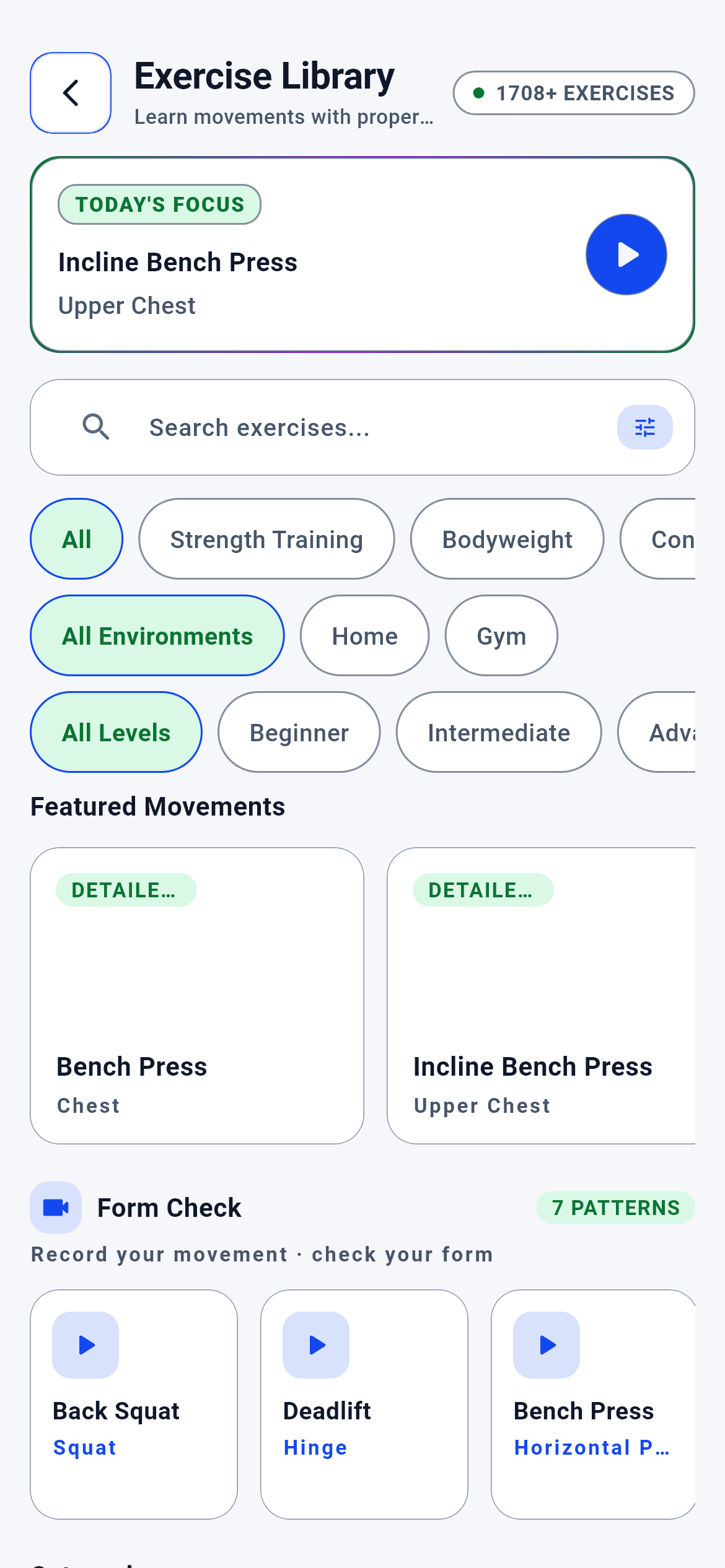
Exercise Library · 1/5
The module’s entry screen. You get here from the library card on the home screen or from the "Exercise Library" label at the top of a movement card. Its address is /exercise-library.
You pick a category by muscle group, type a movement name into the search box, or narrow the list with one of the three filter strips.
- A category card (Chest · Back · Legs · Shoulders · Arms · Core · Full Body) → that category’s list screen (exercise_hub_build_methods_part.dart:267)
- The Today’s Focus card → that movement’s detail card (exercise_library_hub_screen.dart:178)
- A card in the Featured Movements strip → that movement’s detail card (exercise_hub_build_methods_part.dart:112)
- A card in the "Check your form" strip → that movement’s DETAIL CARD. Recording does not start here; the record button lives inside the detail card (exercise_hub_build_methods_part.dart:208)
- Back → the screen you came from, or the home screen if you opened this directly (exercise_library_hub_screen.dart:112)
What is on this screen 6
Say you open the screen for the first time and a badge with a green dot to the right of the title reads "1708+ EXERCISES".
That number is the total movement count in the catalogue, and it comes from the server.
The badge is drawn only after the server’s answer arrives; with no answer it is not drawn at all. The reason it is built this way: if the device held a fallback number, the moment the server could not be reached the screen would present a stale number as fact. An invented number is more harmful than a missing one, because you trust it.
If you see the badge, the list is fresh. If it is missing, the screen does not hand you an empty list but says "could not be fetched, try again".
The system calls this a "server-authoritative count".
Say there is a green-framed card at the top reading "TODAY’S FOCUS — Incline Bench Press". When you open the same screen tomorrow, a different movement is there.
The card picks one movement per calendar day and does not change during that day.
The choice is not random but bound to the date: the candidate pool is eight movements with rich content, and the server decides which of them is shown. Were it random, opening the screen twice would show you two different movements and the card would be noise rather than a recommendation.
If you want to read one movement a day, this card is your starting point. Tapping it takes you to that movement’s full card.
The system calls this the "daily focus".
Say you see the "Check your form" heading with "6 PATTERNS" next to it and camera-icon cards below. You tap a card and no recording starts.
That strip is not a record button but a shortcut to the movements the camera can measure; the card takes you to that movement’s information card.
The button that starts recording is deliberately inside the detail card, because you need to read how the movement is performed before you record it. The strip itself is curated on the server: one representative movement is chosen per basic movement pattern. If the list lived on the phone, removing a movement from the catalogue would make the strip silently draw an empty card.
To have your form measured, tap the card, read the page that opens and start recording from the "Movement Analysis" section at the bottom.
The system calls this a "curated strip".
Say you tap "Intermediate" on the "All levels" strip and the list narrows more than you expected — none of the beginner movements remain.
The level strip is an "exactly this level" filter, not an "up to this level" one.
The filter equates the movement’s minimum skill level to the value you picked. So choosing "Intermediate" also drops beginner-level movements. With an inclusive threshold the list would grow as you selected, and the filter would feel like it was doing nothing.
To see everything suitable for you, leave the strip on "All levels"; if you are after a specific difficulty step, select the single level.
The system calls this an "exact-match filter".
Say you tap the "Home" environment filter and the list shows both home-only movements and ones that work in either setting.
The environment filter returns every movement that covers the place you chose, not only the ones exclusive to it.
Choosing "Home" brings home movements together with those marked "both settings", because a movement that works in a gym and at home works in your home. Read strictly, hundreds of movements needing no barbell would drop out of the home list. The "Both" option, by contrast, shows only those marked for both settings.
If you train at home choose "Home"; if you also go to a gym, do not use the filter at all — the list already contains everything.
The system calls this "inclusive environment eligibility".
Say you tap the settings icon to the right of the search box and nothing happens.
That icon is currently decoration, not a button.
The screen’s filters are the three strips below the icon; there is no separate filter sheet yet. If the icon accepted taps and opened nothing, that would look like a fault — so touch and screen-reader access were deliberately switched off: you can see that it does not press.
To filter, use the sport, environment and level strips below the icon.
In interface terms this is called a "touch deception guard".
Behind the scenes — how the system decides 6
Where the catalogue lives and how many movements it holds
Say you download the app and open the library. The badge says 1708 movements, but the app is nowhere near large enough to carry that much content.
The catalogue lives on the server, not on your phone; the screen asks it questions and draws the answers.
The catalogue is a source of decisions: which movement belongs to which category, which counts as recommended, how many a category holds — all product decisions. With those decisions on the phone, three things happen. One, the app bundle swells with the catalogue. Two, when the catalogue is updated you wait for a store release. Three, the catalogue on the server and the one on the phone silently diverge; the list looks full but is wrong. So the screen carries the QUESTION, not the catalogue.
When the content team corrects a movement’s guidance or the catalogue grows, you do not need to update the app; you see the new version on your next launch.
The system calls this a "thin client".
Categorisation — how 1708 movements fit into 7 boxes
Say you are looking for the "Bulgarian Split Squat". You find it under Legs, but the movement also works the glutes and the core.
Every movement sits in exactly one category, derived from its primary muscle group.
The category list is a fixed seven boxes: Chest, Back, Legs, Shoulders, Arms, Core, Full Body. If a movement appeared in several categories the counts would break — the sum of the seven would exceed the catalogue size, and finding the same movement in two places you would take it for two different movements. Secondary muscles do not determine the category; they are only written on the card’s "Secondary Muscles" row.
If you cannot find a movement, use the search box instead of trying another category; search knows no categories and looks across the whole catalogue.
The system calls this the "category tree".
Technical risk — which movements count as a "safe start"
Say you switch the Legs category to "Recommended" order and the top is not the barbell back squat but simpler movements.
The ranking awards points to low technical-risk movements; risky ones do not earn them.
Every movement in the catalogue has a technical-risk tier. Low tier, or no tier at all, earns +10; medium and high earn nothing. A level penalty is added on top: movements above your level get −10. With both rules working together, the "recommended" list does not push a novice towards a technically demanding movement. The risk tier is the movement’s own field in the catalogue, not computed at ranking time — so the same movement carries the same risk for every user.
If you are starting on a new muscle group, switch to "Recommended"; the movements at the top are the ones whose technique is least likely to go wrong.
The system calls this the "technical risk tier".
Swapping a movement — how the library talks to the training plan
Say Tuesday’s plan has the "Back Squat" but your gym is packed and the squat rack never frees up. You swap the movement from the workout screen and the "Leg Press" comes in.
The replacement is not chosen at random: it is picked from candidates in the same movement pattern by a single chain of rules.
The chain works like this. First the candidate pool is built: every movement in the catalogue with the same pattern, excluding itself. Then the location constraint is applied — at home, home-compatible ones are kept; at the gym, gym-compatible ones; if the filter empties the pool entirely it is not applied, because giving no suggestion is worse than giving a wrong one. The remaining candidates are ordered by three criteria: an exact equipment match with the original first, then the same primary muscle, ties broken alphabetically by id. The same input always yields the same movement; two users in the same conditions get the same suggestion. The decision lives on the server, and if the device gets no answer NO local choice is made — the plan says "could not swap".
The "Movement Type" row in the library is the input to this decision. If you cannot perform a movement, look at its movement type; movements of the same type are the candidates you could pick by hand too.
The system calls this "rule-based substitution".
Choosing a variation — "easier" and "substitutes for" are not the same thing
Say the back squat card has both an "Easier Variations" list and "Variants" chips, and the two name different movements.
There are three separate variation sources, each answering a different question.
The first is the easier variations on the information card: the answer to "if this movement is too heavy for you, which step should you start from". The second is alternative movements: "how else can you do the same job". The third is the catalogue’s variant rules, each with a rationale — for the back squat the rationale is equipment, that is, which one does the job when there is no barbell. Merged into a single list you could not see the difference between "the easier one" and "the equipment substitute", and might pick a movement above your level thinking it was easy.
If the movement is too heavy, look at Easier Variations. If you lack the equipment, look at the Variants chips. If you are bored, look at Alternative Movements.
The system calls these the "variant rules".
The hub asks one question and gets six datasets at once
Say you open the library home screen. There are six separate datasets on it: the counter, the categories, the featured strip, the form-check strip, today’s focus and the filter strips.
All six arrive in a single request, not in six separate ones.
The engine endpoints have a per-minute request budget. Six requests for six datasets would let a single screen opening eat most of it; after a few entries and exits, requests would start being rejected and the screen would come up empty. So the hub is a batched snapshot. The same discipline applies on the search side: while search and filters are off, the list question is never asked and the showcase view stays in force.
The screen fills in one go. There is no need to pull to refresh or to move between tabs.
The system calls this a "batched snapshot".
What your data is for 5
Your training environment (home or gym)
If you provide it When you use the environment strip the list narrows to movements you can actually do, and the "Recommended" order lifts environment-compatible movements with +15 points.
If you skip it With the filter off, the list is the entire catalogue; at home you will also see movements that need a barbell. The screen does not block you, it simply leaves the sorting to you.
Your skill level
If you provide it In the "Recommended" order, movements matching your level exactly get +20 and ones above it get −10; the list starts with what suits you.
If you skip it With no level, neither of those two scores applies and the ranking is built from content richness, risk and movement type alone. The list is not broken, it is just not yours.
Bookmarks (the movements you saved)
If you provide it Pressing the icon at the top right of the card marks the movement on your phone, and reopening the card greets you with a filled icon.
If you skip it If you save nothing the icon stays empty; the library is unaffected and your saved-movements list stays empty too.
Your membership tier
If you provide it On a tier that includes the training engine, the sets/reps/rest panel on the movement card fills with real numbers from the server.
If you skip it On a closed tier the panel shows lock text and writes no numbers. The movement’s guidance, mistakes, safety warnings and variants stay open — the lock is only on the prescription section.
Your movement video (the one you record)
If you provide it If you record a video from the Movement Analysis button at the bottom of the card, your technique is measured and you get a form score; that work happens in the MOVEMENT FORM module.
If you skip it If you record nothing, nothing changes on the library side: the guidance, the cues and the safety warnings are the same for everyone. The library is not a module that changes per person.